
Why Your Shopify Store Is Not Ranking on Google (Fix Shopify SEO Fast)
If your Shopify store isn’t showing up on Google, you’re not alone—and more importantly, you’re not stuck. Thousands of store owners struggle with Shopify SEO, often without realizing what’s actually holding them back. You might have great products, a clean design, and even some traffic from ads—but without strong Shopify SEO, your store remains invisible in organic search. That means you’re missing out on free, consistent traffic that converts over time. The truth is simple: Google doesn’t rank stores based on looks—it ranks them based on structure, relevance, and authority. If your product pages aren’t optimized with the right keywords, if your site speed is slow, or if your content lacks depth, your rankings will suffer. And in 2026, with competition rising across every niche, basic optimization is no longer enough. You need a smarter, data-driven Shopify SEO strategy that aligns with how search engines actually work today.
But here’s the good news—you can fix this faster than you think. Once you understand the core principles of Shopify SEO, everything starts to click. From optimizing your product titles and meta tags to improving your internal linking and creating keyword-rich content, each step builds momentum. Even small changes—like targeting long-tail keywords or improving mobile performance—can dramatically improve your rankings within weeks. The key is consistency and clarity: knowing exactly what to fix and why it matters. Many beginners waste months guessing, but you don’t have to. 👉 “Want to learn how Google really ranks eCommerce stores? Check out this detailed guide.”
This resource breaks down the fundamentals behind Shopify SEO and helps you understand what search engines are actually looking for. Once you combine that knowledge with the strategies in this guide, you’ll be in a much stronger position to rank higher, attract targeted visitors, and turn your Shopify store into a long-term traffic machine.
Introduction: Why Shopify SEO Matters in 2026
In today’s competitive eCommerce landscape, simply launching a store on Shopify is no longer enough. With thousands of new stores going live every day, visibility has become the biggest challenge—and that’s exactly where Shopify SEO comes into play. In 2026, search engines like Google are smarter, more selective, and heavily focused on user experience. This means your store won’t rank just because you have products; it will rank only if your content, structure, and performance meet modern SEO standards. Shopify SEO is the process of optimizing your store so it appears higher in search results, bringing in consistent, organic traffic without relying heavily on paid ads. For store owners looking to build long-term, sustainable income, mastering Shopify SEO is not optional—it’s essential.
The importance of Shopify SEO in 2026 goes beyond just rankings—it directly impacts your sales, brand authority, and long-term growth. When your store ranks on Google, you attract buyers who are already searching for what you sell, which means higher conversion rates compared to random traffic. Additionally, strong Shopify SEO helps you build trust with both search engines and customers. Fast-loading pages, mobile-friendly design, optimized product descriptions, and strategic keyword usage all contribute to better rankings and a smoother user experience. Many beginners make the mistake of focusing only on design or ads, but without SEO, their growth remains limited and expensive. On the other hand, a well-optimized Shopify store can generate passive traffic for months or even years. As competition continues to rise, those who invest in Shopify SEO early will have a significant advantage over others. If you’re wondering why your store still isn’t ranking despite your efforts, it’s important to understand the core issues first 👉 “Still not ranking on Google? Discover the exact reasons and fixes here.”
What Is Shopify SEO and How It Works
If you want your store to rank on Google and attract consistent, free traffic, understanding Shopify SEO is essential. In simple terms, Shopify SEO refers to the process of optimizing your Shopify store so that search engines can easily find, understand, and rank your pages higher in search results. Unlike paid ads that stop generating traffic once your budget runs out, Shopify SEO focuses on long-term growth by improving your store’s visibility organically. It includes optimizing product pages, collections, blog content, images, and even your website structure. When done correctly, Shopify SEO helps you reach buyers who are already searching for products like yours, which means higher-quality traffic and better conversion rates.
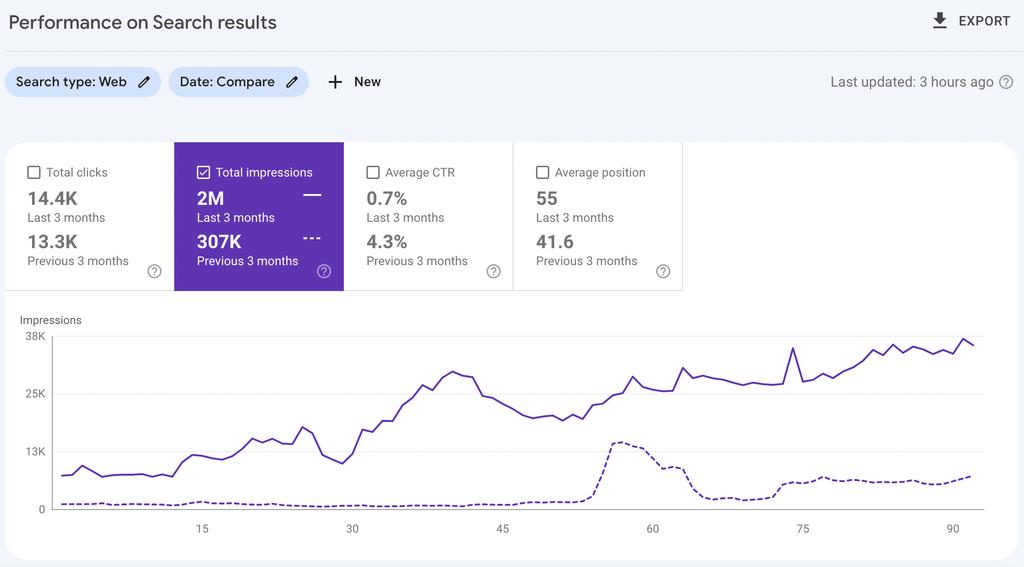
So, how does Shopify SEO actually work? Search engines use algorithms to analyze multiple factors before ranking your store. These include keyword relevance, content quality, user experience, page speed, and backlinks. For example, if your product title includes the right keywords that match what users are searching for, your chances of ranking increase. Similarly, fast-loading pages and mobile-friendly design improve your store’s performance in search results. Shopify SEO also involves creating valuable content, such as blog posts and guides, that answer user queries and build authority in your niche. Internal linking between pages helps search engines understand your site structure, while external backlinks signal trust and credibility. In short, Shopify SEO works by aligning your store with what both users and search engines want—relevant content, smooth experience, and reliable information. If your store is missing these elements, it won’t rank effectively. 👉 “Still wondering why your store isn’t ranking? Read this detailed breakdown before making your next change.”
Why Your Shopify Store Is Not Ranking on Google
If your Shopify store isn’t showing up on Google, the problem usually isn’t your product—it’s your Shopify SEO. Many store owners invest in design, ads, and apps but ignore the core factors that search engines actually use to rank pages. In 2026, Shopify SEO has become more competitive and more technical. Google now prioritizes relevance, user experience, and authority over everything else. That means if your store lacks proper keyword targeting, optimized pages, fast loading speed, and trust signals, it will struggle to appear in search results.
The good news? These problems are fixable. Once you understand the real reasons behind low rankings, you can systematically improve your Shopify SEO and start attracting organic traffic that converts. Let’s break down the most common issues that prevent Shopify stores from ranking—and how to fix them.
3.1 Poor Keyword Research
Keyword research is the foundation of Shopify SEO. If you target the wrong keywords, your store will never reach the right audience—no matter how good your product is. Many beginners make the mistake of targeting broad, high-competition keywords like “shoes” or “jewelry.” These keywords are dominated by big brands, making it almost impossible for new stores to rank.
Instead, you should focus on long-tail keywords like “handmade leather shoes for men” or “minimalist gold jewelry for women.” These keywords have lower competition and higher buyer intent.
👉 Fix:
Use keyword research tools, analyze competitors, and target keywords that your ideal customers are actually searching for. Strong keyword research directly improves your Shopify SEO performance.
3.2 Weak On-Page Shopify SEO
Even if you have the right keywords, poor on-page optimization can stop your store from ranking. On-page Shopify SEO includes elements like titles, meta descriptions, product descriptions, headings, and image alt text. If these are not optimized properly, Google won’t understand what your page is about.
For example, a product titled “Nice Shoes” provides no SEO value. But a title like “Men’s Handmade Leather Shoes – Comfortable & Durable” is both keyword-rich and user-friendly.
In the middle of optimizing your pages, you should also focus on improving your internal structure 👉 “Want to understand how to structure your store for better rankings? Read this complete Shopify SEO guide.”
👉 Fix:
- Use your focus keyword “Shopify SEO” naturally in titles and descriptions
- Optimize product pages with detailed, keyword-rich content
- Add alt text to all images
- Use proper heading structure (H1, H2, H3)
3.3 Slow Website Speed
Website speed is a major ranking factor in Shopify SEO. If your store loads slowly, users will leave—and Google will notice. A high bounce rate signals poor user experience, which directly impacts your rankings.
Common causes of slow Shopify stores include:
- Heavy images
- Too many apps
- Unoptimized themes
👉 Fix:
- Compress images without losing quality
- Remove unnecessary apps
- Use a lightweight, fast-loading theme
A fast website not only improves Shopify SEO but also increases conversions.
3.4 Lack of Quality Content
Google doesn’t rank stores—it ranks content. If your Shopify store only has product pages and no valuable content, it will struggle to rank.
Content like blogs, guides, and FAQs helps you target more keywords and attract organic traffic. For example, a blog post like “How to Choose the Best Running Shoes” can bring in visitors who later convert into buyers.
👉 Fix:
- Start a blog on your Shopify store
- Write keyword-rich, helpful content
- Answer customer questions through articles
High-quality content builds trust, improves engagement, and strengthens your Shopify SEO.
3.5 No Backlinks or Authority
Backlinks are one of the strongest ranking factors in Shopify SEO. If no other websites are linking to your store, Google sees it as less trustworthy.
Think of backlinks as “votes of confidence.” The more quality links you have, the higher your authority.
👉 Fix:
- Get backlinks from blogs, directories, and guest posts
- Collaborate with influencers
- Share content on social platforms
Building authority takes time, but it’s essential for long-term Shopify SEO success.
Final Thoughts
If your Shopify store is not ranking on Google, it’s usually due to these five core issues: poor keyword research, weak on-page Shopify SEO, slow speed, lack of content, and no authority. The key is not to fix everything at once—but to improve step by step.
Start with keyword research, optimize your listings, improve site speed, and build content consistently. Over time, your Shopify SEO will strengthen, your rankings will improve, and your store will start attracting the organic traffic it deserves.
Shopify SEO Basics Every Beginner Must Know
If you want your store to get consistent, free traffic, understanding Shopify SEO is not optional—it’s essential. Many beginners launch beautiful stores on Shopify but struggle to rank on Google because they ignore SEO fundamentals. The reality is simple: without proper Shopify SEO, your products won’t appear in search results, no matter how good they are. The goal of Shopify SEO is to help search engines understand your store, match it with the right audience, and rank it higher for relevant queries. When done correctly, Shopify SEO can bring long-term, organic traffic that converts into real sales—without relying heavily on paid ads.
1. What Is Shopify SEO and Why It Matters
Shopify SEO refers to optimizing your online store so it ranks higher on search engines like Google. This includes improving your website structure, content, keywords, and technical performance. Unlike ads, SEO delivers long-term results. Once your pages rank, they can generate traffic for months or even years.
For beginners, this is a game-changer. Instead of spending money on ads every day, you can build a system where customers find you naturally. Shopify SEO also improves trust—people tend to click organic results more than paid ones.
2. Keyword Research: The Foundation of Shopify SEO
Every successful Shopify SEO strategy starts with the right keywords. Keywords are the words your potential customers type into Google when searching for products.
For example, instead of targeting a broad keyword like “shoes,” a smarter approach would be “men’s running shoes for flat feet.” These are called long-tail keywords, and they are easier to rank for.
To find the best keywords:
- Use tools like Google Keyword Planner or Ubersuggest
- Analyze competitors’ listings
- Look at Google autocomplete suggestions
👉 “Still not ranking on Google? Learn the exact reasons and fixes here.”
Place your primary keyword (like Shopify SEO) in:
- Title tags
- Meta descriptions
- Product titles
- URLs
This helps search engines clearly understand your page.
3. On-Page Shopify SEO Optimization
On-page SEO is one of the most important parts of Shopify SEO. It focuses on optimizing individual pages on your store.
Title Tags & Meta Descriptions
Your title tag is the first thing users see on Google. It should be clear, keyword-rich, and compelling.
Example:
“Buy Handmade Leather Wallets – Premium Quality for Men”
Meta descriptions should briefly explain the page and encourage clicks.
Product Page Optimization
Your product pages must include:
- Keyword-rich titles
- Detailed descriptions (not copied)
- Bullet points for features
- FAQs if possible
Avoid using manufacturer descriptions—Google prefers unique content.
URL Structure
Keep your URLs clean and simple.
Bad:
yourstore.com/product123?id=567
Good:
yourstore.com/handmade-leather-wallet
Image Optimization
Images are often ignored, but they play a huge role in Shopify SEO.
- Use high-quality images
- Compress images for faster loading
- Add alt text with keywords
Example alt text:
“handmade leather wallet for men”
4. Technical Shopify SEO Basics
Technical SEO ensures your website runs smoothly and is easy for search engines to crawl.
Site Speed
A slow website kills rankings and conversions. Use:
- Compressed images
- Lightweight themes
- Fewer apps
Google prioritizes fast-loading sites.
Mobile Optimization
Most users shop on mobile devices. Your Shopify store must be:
- Fully responsive
- Easy to navigate
- Fast on mobile
Secure Website (HTTPS)
Security is a ranking factor. Shopify automatically provides SSL certificates, which is a big advantage.
5. Content Strategy for Shopify SEO
Content is one of the most powerful ways to improve Shopify SEO. Adding a blog to your store can bring massive traffic.
For example:
- “Best Gifts for Men in 2026”
- “How to Choose the Perfect Wallet”
These articles attract visitors who are not ready to buy yet—but may convert later.
Internal linking is also important. Linking related pages helps distribute SEO value across your site and improves user experience.
6. Backlinks: Building Authority
Backlinks are links from other websites to your store. They signal trust and authority to Google.
Ways to get backlinks:
- Guest posting
- Collaborating with bloggers
- Listing your store in directories
The more quality backlinks you have, the higher your chances of ranking.
7. Common Shopify SEO Mistakes to Avoid
Many beginners unknowingly hurt their rankings. Avoid these mistakes:
- Using duplicate content
- Ignoring keyword research
- Uploading slow, heavy images
- Not optimizing for mobile
- Skipping meta tags
Fixing these small issues can lead to big improvements.
Final Thoughts
Mastering these Shopify SEO basics can completely transform your store’s performance. You don’t need advanced strategies to start—just focus on the fundamentals: keywords, on-page optimization, technical performance, and content.
Shopify SEO is not a one-time task—it’s an ongoing process. The more consistently you optimize your store, the better your results will be. Start with small changes, track your progress, and improve step by step.
If you apply these basics correctly, your Shopify store won’t just exist—it will rank, attract traffic, and generate real sales over time 🚀
Shopify SEO Basics Every Beginner Must Know
If you want your store to get consistent, free traffic, understanding Shopify SEO is not optional—it’s essential. Many beginners launch beautiful stores on Shopify but struggle to rank on Google because they ignore SEO fundamentals. The reality is simple: without proper Shopify SEO, your products won’t appear in search results, no matter how good they are. The goal of Shopify SEO is to help search engines understand your store, match it with the right audience, and rank it higher for relevant queries. When done correctly, Shopify SEO can bring long-term, organic traffic that converts into real sales—without relying heavily on paid ads.
1. What Is Shopify SEO and Why It Matters
Shopify SEO refers to optimizing your online store so it ranks higher on search engines like Google. This includes improving your website structure, content, keywords, and technical performance. Unlike ads, SEO delivers long-term results. Once your pages rank, they can generate traffic for months or even years.
For beginners, this is a game-changer. Instead of spending money on ads every day, you can build a system where customers find you naturally. Shopify SEO also improves trust—people tend to click organic results more than paid ones.
2. Keyword Research: The Foundation of Shopify SEO
Every successful Shopify SEO strategy starts with the right keywords. Keywords are the words your potential customers type into Google when searching for products.
For example, instead of targeting a broad keyword like “shoes,” a smarter approach would be “men’s running shoes for flat feet.” These are called long-tail keywords, and they are easier to rank for.
To find the best keywords:
- Use tools like Google Keyword Planner or Ubersuggest
- Analyze competitors’ listings
- Look at Google autocomplete suggestions
👉 “Still not ranking on Google? Learn the exact reasons and fixes here.”
Place your primary keyword (like Shopify SEO) in:
- Title tags
- Meta descriptions
- Product titles
- URLs
This helps search engines clearly understand your page.
3. On-Page Shopify SEO Optimization
On-page SEO is one of the most important parts of Shopify SEO. It focuses on optimizing individual pages on your store.
Title Tags & Meta Descriptions
Your title tag is the first thing users see on Google. It should be clear, keyword-rich, and compelling.
Example:
“Buy Handmade Leather Wallets – Premium Quality for Men”
Meta descriptions should briefly explain the page and encourage clicks.
Product Page Optimization
Your product pages must include:
- Keyword-rich titles
- Detailed descriptions (not copied)
- Bullet points for features
- FAQs if possible
Avoid using manufacturer descriptions—Google prefers unique content.
URL Structure
Keep your URLs clean and simple.
Bad:
yourstore.com/product123?id=567
Good:
yourstore.com/handmade-leather-wallet
Image Optimization
Images are often ignored, but they play a huge role in Shopify SEO.
- Use high-quality images
- Compress images for faster loading
- Add alt text with keywords
Example alt text:
“handmade leather wallet for men”
4. Technical Shopify SEO Basics
Technical SEO ensures your website runs smoothly and is easy for search engines to crawl.
Site Speed
A slow website kills rankings and conversions. Use:
- Compressed images
- Lightweight themes
- Fewer apps
Google prioritizes fast-loading sites.
Mobile Optimization
Most users shop on mobile devices. Your Shopify store must be:
- Fully responsive
- Easy to navigate
- Fast on mobile
Secure Website (HTTPS)
Security is a ranking factor. Shopify automatically provides SSL certificates, which is a big advantage.
5. Content Strategy for Shopify SEO
Content is one of the most powerful ways to improve Shopify SEO. Adding a blog to your store can bring massive traffic.
For example:
- “Best Gifts for Men in 2026”
- “How to Choose the Perfect Wallet”
These articles attract visitors who are not ready to buy yet—but may convert later.
Internal linking is also important. Linking related pages helps distribute SEO value across your site and improves user experience.
6. Backlinks: Building Authority
Backlinks are links from other websites to your store. They signal trust and authority to Google.
Ways to get backlinks:
- Guest posting
- Collaborating with bloggers
- Listing your store in directories
The more quality backlinks you have, the higher your chances of ranking.
7. Common Shopify SEO Mistakes to Avoid
Many beginners unknowingly hurt their rankings. Avoid these mistakes:
- Using duplicate content
- Ignoring keyword research
- Uploading slow, heavy images
- Not optimizing for mobile
- Skipping meta tags
Fixing these small issues can lead to big improvements.
Final Thoughts
Mastering these Shopify SEO basics can completely transform your store’s performance. You don’t need advanced strategies to start—just focus on the fundamentals: keywords, on-page optimization, technical performance, and content.
Shopify SEO is not a one-time task—it’s an ongoing process. The more consistently you optimize your store, the better your results will be. Start with small changes, track your progress, and improve step by step.
If you apply these basics correctly, your Shopify store won’t just exist—it will rank, attract traffic, and generate real sales over time 🚀
Keyword Research for Shopify SEO (Step-by-Step Guide)
If you want your store to rank on Google, mastering keyword research is non-negotiable. At the core of effective Shopify SEO is understanding what your potential customers are actually searching for—and aligning your product pages with those exact queries. Many Shopify store owners fail here because they either target keywords that are too broad or too competitive. For example, trying to rank for a term like “shoes” is nearly impossible for a new store. Instead, successful sellers focus on long-tail keywords such as “men’s lightweight running shoes for beginners” or “handmade leather formal shoes for office.” These keywords may have lower search volume, but they bring highly targeted traffic that is more likely to convert. This is where Shopify SEO becomes powerful—you’re not just chasing traffic, you’re attracting the right audience.
Step 1: Understand Buyer Intent
Before you even open a keyword tool, think like your customer. Are they searching to buy, compare, or just browse? Keywords like “buy,” “best,” “affordable,” or “near me” indicate strong purchase intent. For Shopify SEO, always prioritize commercial intent keywords because they lead to sales, not just clicks.
Step 2: Use Keyword Research Tools
To find the right keywords, use tools like Ubersuggest, Ahrefs, or even Google’s autocomplete feature. Start by typing your product name and analyze the suggestions. These are real searches people are making. Look for keywords with:
- Medium search volume
- Low to medium competition
- Clear buyer intent
This combination gives you the best chance to rank quickly with Shopify SEO.
Step 3: Analyze Competitors
Search your main keyword on Google and study the top-ranking Shopify stores. Look at their:
- Product titles
- Meta descriptions
- Content structure
👉 “Want to avoid the biggest SEO mistakes beginners make? Read this before optimizing your store.”
This will help you understand what’s already working and how you can improve it with better Shopify SEO strategies.
Step 4: Find Long-Tail Keywords
Long-tail keywords are the backbone of Shopify SEO. Instead of targeting “necklace,” go for:
- “personalized gold name necklace for women”
- “birthday gift necklace for girlfriend”
These keywords are easier to rank for and bring highly targeted buyers.
Step 5: Group Keywords Smartly
Don’t use random keywords. Organize them into groups:
- Primary keyword (main focus)
- Secondary keywords (variations)
- Supporting keywords (related terms)
For example:
Primary: Shopify SEO
Secondary: Shopify SEO tips, Shopify SEO strategy
Supporting: eCommerce SEO, product page optimization
This structure helps search engines understand your content better.
Step 6: Optimize Your Shopify Pages
Once you have your keywords, place them strategically:
- Title tag
- Meta description
- Product description
- Image alt text
- URL slug
But avoid keyword stuffing. Shopify SEO works best when keywords are used naturally within helpful content.
Step 7: Track and Improve
Keyword research is not a one-time task. Use analytics tools to track:
- Rankings
- Traffic
- Conversions
Update your keywords regularly based on performance. Shopify SEO is an ongoing process, and continuous improvement is what separates successful stores from struggling ones.
Final Thoughts
Keyword research is the foundation of Shopify SEO. If you get this step right, everything else—ranking, traffic, and sales—becomes much easier. Focus on buyer intent, use long-tail keywords, and stay consistent with optimization. Over time, your Shopify store will start gaining visibility and attracting the right customers organically.
On-Page Shopify SEO Optimization
When it comes to ranking your store on Google, on-page optimization is the foundation of effective Shopify SEO. This is where you directly control how your store communicates with search engines and users. If your on-page Shopify SEO is weak, even the best products won’t rank. The goal is simple: make your pages clear, relevant, and valuable so Google understands exactly what your store offers. Let’s break down the most important elements you must optimize.
6.1 Title Tags & Meta Descriptions
Title tags are one of the strongest ranking factors in Shopify SEO. Your title should include your primary keyword naturally while staying compelling for clicks.
Best Practices:
- Keep it under 60 characters
- Place your keyword at the beginning
- Add a benefit or hook
Example:
“Handmade Leather Wallet – Premium Quality for Men”
Meta descriptions don’t directly impact rankings but significantly improve click-through rate (CTR). A well-written meta description can increase traffic even if your ranking stays the same.
Pro Tip:
Write meta descriptions like ad copy—clear, benefit-driven, and action-oriented.
6.2 Product Page Optimization
Your product pages are your main revenue drivers, and optimizing them properly is essential for Shopify SEO success. Each product page should target a specific keyword and provide detailed, helpful information.
Key Elements to Optimize:
- Product title (keyword-rich but natural)
- Detailed product description (300–500+ words)
- Bullet points for features and benefits
- FAQs within the product page
Avoid copying manufacturer descriptions—duplicate content kills rankings. Instead, write unique, engaging content that answers customer questions.
👉 “Want to learn how to fix your Shopify ranking issues step-by-step? Read this detailed guide.
6.3 URL Structure & Slugs
Clean URLs are critical for both SEO and user experience. Shopify automatically generates URLs, but you should always customize them.
Bad URL:
yourstore.com/products/p12345
Optimized URL:
yourstore.com/products/leather-wallet-men
Best Practices:
- Keep URLs short and readable
- Include your target keyword
- Avoid unnecessary numbers or symbols
A well-structured URL tells both users and search engines what your page is about, strengthening your overall Shopify SEO strategy.
6.4 Image Optimization
Images play a huge role in both user experience and SEO. Many Shopify store owners ignore this, but properly optimized images can drive additional traffic from search engines.
What to Optimize:
- File names (use keywords, e.g., leather-wallet-men.jpg)
- Alt text (describe the image using your keyword naturally)
- Image size (compress for faster loading speed)
Fast-loading pages are a ranking factor, so large, uncompressed images can hurt your Shopify SEO performance. Tools like Canva can help create optimized visuals.
Additionally, use multiple images showing different angles, lifestyle usage, and close-ups. This not only improves SEO but also boosts conversions.
Final Thoughts
Mastering on-page Shopify SEO is not optional—it’s essential if you want to rank higher and get consistent organic traffic. By optimizing your title tags, product pages, URLs, and images, you create a strong SEO foundation that supports long-term growth.
Remember, Shopify SEO is not about tricks—it’s about clarity, relevance, and user experience. When you optimize each element properly, search engines reward your store with better visibility, and that’s where real growth begins. 🚀
Technical Shopify SEO Fixes
If your store isn’t ranking despite good products and decent content, the problem often lies in technical gaps. Strong Shopify SEO isn’t just about keywords—it’s also about how well your store performs behind the scenes. Search engines like Google prioritize fast, mobile-friendly, and error-free websites. If your Shopify store fails in these areas, your rankings will drop—no matter how good your content is. Let’s break down the most important technical Shopify SEO fixes you must implement to improve visibility and performance.
7.1 Site Speed Optimization
Website speed is a critical ranking factor in Shopify SEO. A slow-loading store not only frustrates users but also signals poor experience to search engines. Studies show that even a 1-second delay can significantly reduce conversions and increase bounce rates.
To improve speed, start by compressing images without losing quality. Large image files are one of the biggest reasons Shopify stores load slowly. Use modern formats like WebP and minimize unnecessary apps that add extra scripts to your site. Choose a lightweight, optimized theme and avoid heavy animations that slow down performance.
Another powerful tactic is enabling lazy loading, which ensures images load only when users scroll down. This improves initial page load time dramatically. Additionally, leverage browser caching and reduce unused code (CSS/JavaScript) wherever possible.
👉 “Still struggling with traffic and performance issues? Learn the exact reasons your store isn’t ranking and fix them fast.”
Improving site speed is one of the fastest ways to boost Shopify SEO results because it directly impacts both rankings and user experience.
7.2 Mobile Optimization
In 2026, mobile-first indexing is no longer optional—it’s the standard. Most users browse and shop using their smartphones, and Google primarily evaluates your mobile version for ranking. If your store isn’t mobile-optimized, your Shopify SEO will suffer significantly.
Start by ensuring your Shopify theme is fully responsive. Your design should automatically adjust to different screen sizes without breaking layouts. Buttons should be easy to click, text should be readable without zooming, and images should scale properly.
Navigation is another key factor. A cluttered menu or complicated checkout process can drive mobile users away. Simplify your navigation, reduce steps in checkout, and ensure fast loading on mobile networks.
Also, test your store regularly using mobile performance tools. Check for issues like overlapping elements, slow-loading pages, or broken layouts. Fixing these small problems can lead to big improvements in rankings and conversions.
Remember, a smooth mobile experience not only helps Shopify SEO but also increases sales.
7.3 Fixing Crawl Errors
Crawl errors can silently damage your Shopify SEO. These occur when search engines are unable to access or properly index your pages. If important pages aren’t indexed, they simply won’t appear in search results.
Common crawl issues include:
- Broken links (404 errors)
- Redirect loops
- Missing pages
- Incorrect sitemap or robots.txt settings
To fix these, regularly monitor your site using tools like Google Search Console. Identify pages that return errors and either fix, redirect, or remove them. For example, if a product page is deleted, redirect it to a related product or category instead of leaving a dead link.
Another important step is submitting an updated sitemap to Google. Shopify automatically generates a sitemap, but you should ensure it’s properly indexed. Also, avoid blocking important pages in your robots.txt file.
Clean site structure and proper internal linking make it easier for search engines to crawl your store efficiently. When your site is error-free, your Shopify SEO becomes stronger and more reliable.
Final Thoughts
Technical fixes may not be visible to your customers, but they play a huge role in your success. By improving speed, optimizing for mobile, and fixing crawl errors, you create a strong foundation for Shopify SEO. Once these elements are in place, your store becomes easier to rank, faster to load, and more enjoyable to use—leading to higher traffic and better conversions.
Content Strategy for Shopify SEO
A strong content strategy is the backbone of effective Shopify SEO. While many store owners focus only on product listings, the real growth comes from building a content ecosystem that attracts, educates, and converts visitors. Search engines like Google prioritize websites that consistently publish valuable, relevant, and keyword-optimized content. If your Shopify store lacks this, it becomes difficult to rank for competitive keywords. The goal of a content strategy is simple: bring in organic traffic through informative content and guide that traffic toward your product pages. When done correctly, Shopify SEO content not only increases visibility but also builds trust, authority, and long-term sales potential.
8.1 Blogging for Traffic
Blogging is one of the most powerful yet underutilized strategies in Shopify SEO. Instead of relying only on product pages, you can create blog posts that target informational keywords your audience is already searching for. For example, if you sell fitness products, you could write articles like “Best Home Workout Equipment for Beginners” or “How to Build a Daily Fitness Routine.” These topics attract users at the research stage, bringing them into your store organically.
The key is to write SEO-optimized, value-driven content that answers real questions. Each blog post should include your focus keyword naturally, along with related terms. Over time, these articles act as traffic magnets, consistently bringing visitors without paid ads. 👉 “Still struggling to get traffic? Learn how to fix common issues that stop your Shopify store from ranking.”
8.2 Internal Linking Strategy
Internal linking is a powerful but often overlooked part of Shopify SEO. It helps search engines understand the structure of your website and guides users toward important pages. When you link your blog posts to relevant product pages, collections, or other articles, you create a clear pathway for both users and search engines.
For example, if you write a blog about “best gifts for men,” you can link directly to your product collection. This increases the chances of conversion while also improving SEO performance. Internal links distribute authority across your site, helping weaker pages rank better. It also reduces bounce rate because users are encouraged to explore more content.
To make the most of internal linking:
- Use descriptive anchor text (not just “click here”)
- Link to relevant and related pages only
- Maintain a logical structure across your site
A well-planned internal linking strategy can significantly boost your Shopify SEO rankings over time.
8.3 Long-Tail Keywords
Targeting long-tail keywords is one of the smartest ways to improve your Shopify SEO, especially if you’re a beginner. Long-tail keywords are specific phrases with lower competition but higher intent. Instead of targeting a broad term like “shoes,” you can target “comfortable running shoes for women” or “affordable gym shoes for beginners.”
These keywords are easier to rank for and often bring highly targeted traffic that is ready to buy. When you combine long-tail keywords with blog content and optimized product pages, you create multiple entry points for search traffic.
To find long-tail keywords:
- Use keyword research tools
- Analyze competitor listings
- Look at search suggestions on Shopify and Google
Once you identify them, include these keywords naturally in your titles, headings, and content. Avoid keyword stuffing—focus on readability and value.
Final Thoughts
A well-executed content strategy can transform your Shopify store from invisible to highly visible. By combining blogging, internal linking, and long-tail keyword targeting, you create a strong foundation for long-term Shopify SEO success. Instead of chasing quick wins, focus on building consistent, valuable content that attracts and converts your ideal audience.
Off-Page Shopify SEO (Backlinks & Authority Building)
When it comes to ranking your store on Google, on-page optimization alone isn’t enough. You also need strong off-page Shopify SEO to build authority and trust. In simple terms, off-page Shopify SEO refers to everything that happens outside your website—mainly backlinks, brand mentions, and signals that tell Google your store is credible. If your Shopify store is not ranking, chances are you lack high-quality backlinks. Google treats backlinks like “votes of confidence.” The more trusted websites linking to your store, the higher your chances of ranking. But not all links are equal. A single backlink from a high-authority site can be more powerful than dozens of low-quality links. That’s why your focus should always be on quality over quantity when building your Shopify SEO strategy.
One of the most effective ways to improve Shopify SEO is through content-driven link building. Start by creating valuable blog posts, guides, or how-to content related to your niche. For example, if you sell fitness products, write articles like “Best Home Workout Equipment for Beginners.” High-quality content naturally attracts backlinks when others find it useful. You can also reach out to bloggers, influencers, and niche websites for guest posting opportunities. This allows you to include your store link within relevant content, boosting your authority.
👉 “Still struggling with Shopify SEO basics? Learn the exact on-page strategies before building backlinks.”
Another powerful off-page Shopify SEO method is leveraging social platforms like Pinterest and Instagram. While social links may not directly impact rankings, they drive traffic and increase brand visibility, which indirectly improves SEO performance. Pinterest, in particular, acts like a search engine. By creating keyword-rich pins that link back to your Shopify store, you can generate consistent traffic over time. This traffic sends positive signals to Google, helping your store rank higher.
You should also focus on directory listings and niche communities. Submitting your store to relevant business directories and participating in forums can help you earn backlinks and brand mentions. Just make sure these platforms are relevant to your niche and not spammy. Another underrated strategy is building relationships with micro-influencers. When they feature your product on their blogs or websites, you often get valuable backlinks along with targeted traffic.
Finally, consistency is key. Off-page Shopify SEO is not a one-time task—it’s an ongoing process. Aim to build a few high-quality backlinks every week rather than trying to get hundreds overnight. Avoid black-hat tactics like buying spammy links, as they can harm your rankings instead of improving them. Focus on genuine strategies that provide real value to users and websites.
In conclusion, strong off-page Shopify SEO can significantly boost your store’s visibility and rankings. By combining quality backlinks, content marketing, and social signals, you create a powerful authority system that Google trusts. The more authority your store builds, the easier it becomes to rank for competitive keywords and drive consistent organic traffic.
Common Shopify SEO Mistakes to Avoid
If your store isn’t ranking on Google, chances are you’re making one or more critical Shopify SEO mistakes without even realizing it. Many beginners focus only on design or ads, but ignore the core SEO fundamentals that actually drive long-term traffic. Understanding and fixing these mistakes can dramatically improve your visibility, rankings, and sales.
1. Ignoring Proper Keyword Research
One of the biggest Shopify SEO mistakes is targeting the wrong keywords—or worse, not doing keyword research at all. Many store owners use generic terms like “t-shirt” or “shoes,” which are highly competitive and difficult to rank for.
Fix: Focus on long-tail keywords such as “men’s oversized cotton t-shirt” or “women’s running shoes lightweight.” These keywords have lower competition and higher buyer intent, making them essential for effective Shopify SEO.
2. Weak Title Tags and Meta Descriptions
Your title tag and meta description are the first things users see in search results. If they’re not optimized, your store won’t attract clicks—even if it ranks.
A common mistake is either stuffing keywords unnaturally or writing vague titles that don’t match search intent.
Fix: Write clear, compelling, and keyword-rich titles. Include your focus keyword “Shopify SEO” naturally where relevant, and make sure your meta description encourages clicks.
3. Poor Product Page Optimization
Many Shopify stores have thin or duplicate product descriptions. This hurts your rankings because Google prioritizes unique and valuable content.
👉 “Still struggling with traffic but no sales? Here’s the exact reason behind it.”
If your product pages don’t provide detailed information, benefits, and use cases, you’re missing a major Shopify SEO opportunity.
Fix: Write unique descriptions for each product, include keywords naturally, and highlight benefits, not just features.
4. Ignoring Image Optimization
Images play a huge role in both user experience and Shopify SEO. Uploading large, unoptimized images slows down your website, which negatively impacts rankings.
Another common mistake is not using descriptive file names or alt text.
Fix:
- Compress images for faster loading
- Use keyword-rich file names (e.g., “black-leather-wallet.jpg”)
- Add alt text with relevant keywords
5. Slow Website Speed
Site speed is a direct ranking factor. A slow Shopify store increases bounce rate and reduces conversions.
Many beginners overload their site with heavy themes, apps, and uncompressed media.
Fix:
- Use a lightweight theme
- Remove unnecessary apps
- Optimize images and scripts
Faster loading = better Shopify SEO performance.
6. No Internal Linking Strategy
Internal linking helps search engines understand your site structure and improves user navigation. However, many Shopify store owners ignore this completely.
Without internal links, your important pages don’t get enough SEO value.
Fix: Link related products, blog posts, and collections naturally within your content. This strengthens your overall Shopify SEO strategy.
7. Not Creating SEO Content (Blogging)
Relying only on product pages is a huge mistake. Shopify stores that publish blog content get significantly more traffic.
Blogging allows you to target informational keywords and bring in top-of-funnel visitors.
Fix: Create helpful blog posts around your niche, such as guides, tips, and comparisons, and link them to your products.
8. Ignoring Mobile Optimization
Most users browse and shop via mobile devices. If your store isn’t mobile-friendly, your rankings and conversions will suffer.
Fix:
- Use responsive design
- Test your site on different devices
- Ensure fast loading on mobile
Final Thoughts
Avoiding these common Shopify SEO mistakes can instantly improve your store’s performance. The key is to focus on fundamentals—keyword research, content quality, site speed, and user experience.
Remember, Shopify SEO is not a one-time task. It’s an ongoing process of optimization and improvement. Fix these mistakes today, and you’ll be one step closer to ranking higher, getting more traffic, and increasing your sales. 🚀
Pro Tips to Rank Your Shopify Store Faster
If you want faster results from your store, you need to go beyond basic optimization and start applying advanced Shopify SEO strategies. Ranking on Google isn’t just about adding keywords—it’s about creating a complete system that signals relevance, authority, and user value. The good news? You don’t need a huge budget or a technical background. By focusing on a few high-impact actions, you can significantly improve your visibility and start attracting consistent organic traffic.
1. Target Long-Tail Keywords With Buyer Intent
Most beginners make the mistake of targeting highly competitive keywords like “shoes” or “furniture.” Instead, smart sellers focus on long-tail keywords such as “handmade wooden coffee table for small apartments.” These keywords have lower competition and higher conversion rates. A strong Shopify SEO strategy always prioritizes intent over volume.
👉 Place your focus keyword naturally in:
- Product titles
- Meta descriptions
- Headings (H2/H3)
- Product descriptions
This helps search engines understand exactly what your page is about.
2. Optimize Your Product Pages Like Landing Pages
Your product pages should not just display items—they should sell and rank. Treat each page like a mini landing page optimized for Shopify SEO.
Key elements to optimize:
- Keyword-rich titles
- Clear product descriptions (300+ words)
- Bullet points for features
- FAQs for user queries
- Internal links to related products
👉 “Still not ranking on Google? Here’s the exact reason most Shopify stores fail.”
(You can add your internal link here)
This improves both SEO and user engagement.
3. Improve Site Speed and Mobile Experience
Google prioritizes fast-loading websites, especially for mobile users. If your store takes more than 3 seconds to load, you’re losing both rankings and customers.
Quick fixes:
- Compress images
- Use lightweight themes
- Remove unnecessary apps
- Enable lazy loading
A fast website is a core part of effective Shopify SEO.
4. Build High-Quality Backlinks
Backlinks act like “votes of trust” for your website. The more high-quality links you have, the higher your chances of ranking.
Ways to build backlinks:
- Guest posting on blogs
- Submitting to business directories
- Collaborating with influencers
- Creating shareable content
Even a few strong backlinks can dramatically improve your Shopify SEO performance.
5. Use Content Marketing to Drive Traffic
Content is one of the most powerful tools for Shopify SEO. Instead of relying only on product pages, create blog posts that target informational keywords.
For example:
- “How to Choose the Best Wooden Furniture for Small Spaces”
- “Top 10 Gift Ideas for Home Decor Lovers”
These articles attract traffic and guide users toward your products.
6. Optimize Images for SEO and Speed
Images are critical for both user experience and rankings. Always use descriptive file names and compress images without losing quality.
Example:
Instead of IMG123.jpg → use modern-wooden-table.jpg
This small step strengthens your Shopify SEO and improves page speed.
7. Maintain Consistency and Activity
Shopify rewards active stores. Regular updates signal freshness to search engines.
Stay active by:
- Adding new products weekly
- Updating old listings
- Publishing blog content
- Refreshing keywords
Consistency builds long-term SEO authority.
Final Thoughts
Ranking your store faster isn’t about shortcuts—it’s about applying the right Shopify SEO strategies consistently. Focus on buyer intent keywords, optimize your pages, improve speed, and build authority through backlinks and content.
Small improvements done regularly can lead to massive growth over time. Start implementing these tips today, and your Shopify store will begin to climb higher in search results 🚀
Best Tools for Shopify SEO Optimization
If you want to improve your store’s visibility on Google, using the right tools is essential. Shopify SEO is not just about adding keywords—it’s about data, strategy, and continuous optimization. The right tools help you identify what’s working, fix what’s broken, and uncover new opportunities to rank higher. Whether you’re a beginner or scaling your store, these tools can simplify complex SEO tasks and deliver faster results.
1. Google Search Console (Free & Essential)
Google Search Console is one of the most powerful free tools for Shopify SEO. It allows you to track how your store performs in search results, monitor keyword rankings, and identify indexing issues.
Why it matters:
- Shows which keywords bring traffic
- Helps fix crawl errors
- Improves visibility on Google
Pro Tip: Regularly check the “Performance” tab to find keywords you’re already ranking for and optimize them further.
2. Google Analytics (User Behavior Insights)
Understanding your visitors is crucial for improving Shopify SEO. Google Analytics helps you analyze user behavior, bounce rates, and conversion paths.
Why it matters:
- Tracks traffic sources
- Identifies high-performing pages
- Helps improve user experience (UX)
Better UX = better rankings.
3. Ahrefs (Advanced SEO Tool)
Ahrefs is a premium tool used by professionals to analyze backlinks, keywords, and competitors.
Key features:
- Keyword research with difficulty scores
- Backlink analysis
- Competitor insights
Pro Tip: Use Ahrefs to find low-competition keywords that your competitors are missing.
4. SEMrush (All-in-One SEO Suite)
Another powerful tool is SEMrush. It’s perfect for Shopify store owners who want an all-in-one solution.
What it offers:
- Keyword tracking
- Site audit reports
- Content optimization suggestions
SEMrush helps you identify technical issues that may be hurting your Shopify SEO performance.
5. Ubersuggest (Budget-Friendly Option)
If you’re just starting, Ubersuggest is a great alternative to expensive tools.
Benefits:
- Easy keyword research
- SEO audit reports
- Content ideas
It’s simple, beginner-friendly, and effective for improving Shopify SEO.
6. Shopify SEO Apps (Built-in Advantage)
One of the biggest advantages of Shopify is its app ecosystem. There are many apps designed specifically for Shopify SEO.
Popular options include:
- Plug In SEO
- Smart SEO
- SEO Manager
These apps help automate tasks like meta tags, image optimization, and structured data.
👉 “Still confused why your store isn’t ranking even after using tools? Read this detailed guide to fix Shopify SEO mistakes.”
7. Yoast SEO for Shopify
Yoast SEO (available for Shopify) helps optimize content with real-time SEO suggestions.
Why it’s useful:
- Improves readability
- Ensures keyword placement
- Optimizes meta tags
This is especially helpful for blog content within your Shopify store.
8. PageSpeed Insights (Technical SEO Must)
Site speed is a major ranking factor. Google PageSpeed Insights helps you analyze and improve your website speed.
Key benefits:
- Identifies slow-loading elements
- Provides optimization suggestions
- Improves mobile performance
Faster site = better rankings + better conversions.
Final Thoughts
Using the best tools for Shopify SEO optimization can significantly improve your rankings, traffic, and sales. Instead of guessing, these tools give you real data to make smarter decisions. Start with free tools like Google Search Console and Google Analytics, then gradually move to advanced tools like Ahrefs or SEMrush as your store grows.
Remember, Shopify SEO is not a one-time task—it’s an ongoing process. The more consistently you analyze and optimize, the better your results will be over time.
Shopify SEO Checklist (Quick Action Plan)
If you want faster rankings and consistent organic traffic, you need a clear, repeatable system—not random tweaks. This Shopify SEO checklist (quick action plan) gives you exactly that. Instead of guessing what works, follow these steps to build a strong foundation for Shopify SEO and improve your visibility on Google.
1. Fix Your Keyword Strategy First
Every successful Shopify store starts with the right keywords. Without proper targeting, even the best-designed store won’t rank.
Action Steps:
- Use long-tail keywords (e.g., “minimalist gold necklace for women”)
- Place keywords naturally in titles, descriptions, and headings
- Avoid keyword stuffing
Quick Win: Focus on buyer-intent keywords, not just high-volume ones.
2. Optimize Title Tags & Meta Descriptions
Your title tag is one of the most powerful ranking factors in Shopify SEO. It also impacts your click-through rate (CTR).
Action Steps:
- Keep titles under 60 characters
- Include your main keyword at the beginning
- Write compelling meta descriptions (under 160 characters)
👉 “Still confused why your store isn’t ranking? Learn the real reasons and fix them fast.”
3. Improve Product Page SEO
Product pages are your money pages. If they’re not optimized, you lose both rankings and sales.
Action Steps:
- Write unique product descriptions (avoid copy-paste)
- Add keywords naturally in headings (H1, H2)
- Use bullet points for readability
Pro Tip: Answer common buyer questions within your product description.
4. Optimize Images for SEO & Speed
Images impact both user experience and rankings. Heavy images can slow your store, hurting your Shopify SEO.
Action Steps:
- Compress images before uploading
- Use keyword-rich file names (e.g., handmade-leather-wallet.jpg)
- Add descriptive alt text
5. Improve Site Speed & Mobile Experience
Google prioritizes fast and mobile-friendly websites. A slow store kills rankings.
Action Steps:
- Use a lightweight Shopify theme
- Remove unnecessary apps
- Test your site on mobile devices
Quick Win: Aim for loading time under 3 seconds.
6. Create SEO-Friendly URLs
Clean URLs help both users and search engines understand your content.
Action Steps:
- Keep URLs short and keyword-rich
- Avoid random numbers or symbols
- Use hyphens instead of underscores
Example:
✅ yourstore.com/products/leather-wallet
❌ yourstore.com/p123?id=456
7. Build Internal Linking Structure
Internal linking helps distribute SEO value across your store and improves indexing.
Action Steps:
- Link related products to each other
- Add blog-to-product links
- Use keyword-rich anchor text
Pro Tip: This increases time on site and boosts rankings.
8. Start Content Marketing (Blogging)
Blogging is one of the most underrated parts of Shopify SEO. It helps you rank for informational keywords and bring in free traffic.
Action Steps:
- Write 1–2 SEO articles per week
- Target long-tail keywords
- Link blogs to your product pages
9. Build Backlinks for Authority
Backlinks signal trust to Google. Without them, ranking becomes difficult.
Action Steps:
- Guest post on relevant blogs
- Share content on social platforms
- Get featured in niche directories
10. Track & Improve Performance
SEO is not one-time work—it’s ongoing.
Action Steps:
- Use Google Analytics to track traffic
- Monitor keyword rankings
- Update underperforming pages
Final Thoughts
This Shopify SEO checklist (quick action plan) is your roadmap to better rankings and more traffic. Don’t try to do everything at once—start with keyword optimization and product pages, then move step by step.
Consistency beats perfection. If you apply these Shopify SEO strategies regularly, your store will not only rank higher but also generate long-term, passive traffic and sales.
Conclusion: Fix Your Shopify SEO and Start Ranking Today
If your store isn’t showing up on Google, it’s not a sign that your business can’t succeed—it’s a signal that your Shopify SEO needs attention. The difference between stores that struggle and those that generate consistent sales often comes down to one thing: how well they understand and implement Shopify SEO. By now, you’ve seen that ranking on Google isn’t about shortcuts or hacks. It’s about building a strong foundation—optimizing your keywords, improving your site structure, creating valuable content, and delivering a smooth user experience. When all these elements work together, your Shopify store becomes more than just an online shop—it becomes a search-friendly asset that attracts organic traffic every single day.
The most important step now is action. Start by auditing your existing store. Look at your product pages—are your titles optimized with relevant keywords? Are your meta descriptions compelling enough to drive clicks? Is your site fast, mobile-friendly, and easy to navigate? These are the core pillars of Shopify SEO, and even small improvements here can create noticeable changes in your rankings. Many store owners wait for perfect conditions before making updates, but the truth is, SEO rewards those who take consistent action. Update one product page today, improve one collection page tomorrow, and within weeks, you’ll begin to see momentum building. 👉 “Still struggling to get traffic? Discover the exact mistakes that might be holding your store back.”
Another critical factor in Shopify SEO is consistency over time. Search engines don’t just evaluate your store once—they continuously analyze how relevant and active it is. That means regularly adding new content, optimizing existing listings, and refining your keyword strategy based on performance. You should also focus on building internal links between your blog posts and product pages, as this helps both users and search engines navigate your store more effectively. Over time, this creates a strong SEO ecosystem that boosts your overall authority and ranking potential.
It’s also worth remembering that Shopify SEO is a long-term investment. Unlike paid ads, which stop bringing traffic the moment you stop spending, SEO continues to deliver results long after the work is done. A well-optimized product page can rank for months—or even years—bringing in free, targeted visitors who are ready to buy. That’s the real power of Shopify SEO: sustainable growth without ongoing ad costs. But this only happens if you commit to doing it the right way—focusing on quality, relevance, and user experience.
In the end, success on Shopify doesn’t come from luck—it comes from strategy and execution. You don’t need to be an expert overnight. You just need to start applying what you’ve learned about Shopify SEO, step by step. Fix what’s broken, improve what’s working, and keep moving forward. Every optimized page, every keyword you target, and every improvement you make brings you closer to higher rankings and better results.
Your Shopify store has the potential to rank, attract traffic, and generate consistent sales. Now it’s time to take control, fix your Shopify SEO, and start ranking today 🚀
FAQs (Beginner Questions Answered)
If you’re new to eCommerce, understanding Shopify SEO can feel overwhelming at first. Most beginners struggle not because Shopify is complicated, but because they don’t know what actually impacts rankings on Google. Below are the most common questions answered in a simple, practical way so you can improve your store’s visibility faster.
1. Why is my Shopify store not ranking on Google?
This is one of the most common concerns. If your store isn’t ranking, it usually comes down to weak Shopify SEO fundamentals. This includes poor keyword targeting, thin product descriptions, slow website speed, and lack of backlinks. Google prioritizes stores that provide value and relevance, not just products.
Solution: Focus on strong keyword research, optimize your product pages, and ensure your site is technically sound.
2. How long does Shopify SEO take to show results?
Shopify SEO is not instant. Typically, you may start seeing improvements within 2–6 weeks, but strong rankings can take 2–3 months or more depending on your niche and competition.
Consistency is key. Regularly updating your store, adding content, and improving SEO signals will gradually build your authority.
3. What are the most important Shopify SEO factors?
The core elements of Shopify SEO include:
- Keyword optimization (titles, descriptions, URLs)
- High-quality content
- Fast loading speed
- Mobile-friendly design
- Backlinks and domain authority
Ignoring even one of these can limit your ranking potential.
4. Do I need a blog for Shopify SEO?
Yes, blogging is one of the most powerful ways to improve Shopify SEO. Blogs allow you to target long-tail keywords and attract informational traffic that converts into buyers over time.
For example, instead of only selling a product, you can write guides like “How to Choose the Best Leather Wallet,” which brings in organic traffic.
5. Can I rank Shopify products without backlinks?
It’s possible—but very difficult in competitive niches. Backlinks act as “votes of trust” for your website. Without them, Google may not consider your store authoritative.
Tip: Start by getting backlinks from blogs, directories, or social platforms.
6. How many keywords should I use per page?
Avoid keyword stuffing. Instead, focus on one primary keyword (like Shopify SEO) and a few related variations.
Use them naturally in:
- Title
- Meta description
- Product description
- Headings
Quality matters more than quantity.
7. Is Shopify SEO better than paid ads?
Both have their place. Paid ads bring instant traffic, while Shopify SEO builds long-term, free traffic.
Best strategy: Use ads for short-term sales and Shopify SEO for long-term growth.
8. Does website speed affect Shopify SEO?
Yes—site speed is a major ranking factor. Slow-loading stores lead to higher bounce rates, which negatively impacts rankings.
Fix: Optimize images, use fast themes, and avoid unnecessary apps.
Oh my goodness! Incredible article dude! Thanks, However I am going
through difficulties with your RSS. I don’t know why I cannot
subscribe to it. Is there anybody else having the same
RSS problems? Anyone that knows the answer will you
kindly respond? Thanks!!