
Have you ever opened your Etsy Ads dashboard, expecting to see views and clicks rolling in, only to find nothing? You’re not alone. Thousands of Etsy sellers ask the same frustrating question every day: why are my Etsy ads not showing views, even when their campaigns are active and funded.
If your Etsy ad views not showing the issue is leaving you confused, don’t panic. In many cases, the problem isn’t your products—it’s a hidden setting, a reporting delay, or an optimization issue that’s preventing your ads from gaining visibility. Whether you’re dealing with Etsy ads not getting views, Etsy ads getting no traffic, or an Etsy advertising analytics problem, there are proven solutions that can get your campaigns back on track.
Before you waste more money on ads that appear to be going nowhere, it’s important to understand what’s actually happening behind the scenes. You may even discover that your Etsy ads dashboard delay is creating misleading data.
In this guide, you’ll discover 9 practical fixes that actually work—and how to fix Etsy ads not displaying results the right way.
What Does “Etsy Ad Views Not Showing” Actually Mean?
Seeing zero views in your Etsy Ads dashboard can be alarming, especially when you’re actively paying for advertising. However, in many cases, Etsy ad views not showing doesn’t necessarily mean your ads aren’t being displayed to shoppers.
The issue often comes down to how Etsy tracks, processes, and reports advertising data. Before making drastic changes to your campaigns, it’s important to understand the difference between ad metrics and actual customer activity.
Understanding Etsy Ad Metrics vs. Real Traffic
Many Etsy sellers assume that if their dashboard shows zero views, their ads aren’t running. That’s not always true.
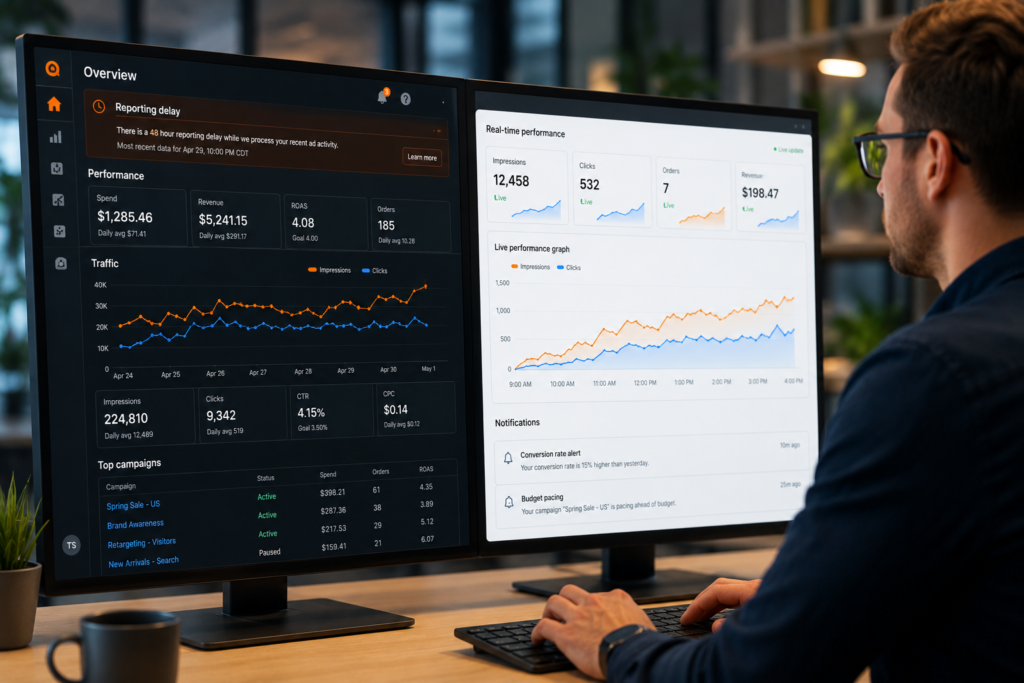
Etsy Ads rely on reporting systems that collect and process data before displaying it inside your dashboard. As a result, there can be delays between when a shopper sees your ad and when that view appears in your account.
Here’s the key difference:
- Ad Views (Impressions): The number of times Etsy displays your promoted listing to shoppers.
- Clicks: The number of users who actually click your ad.
- Shop Traffic: All visitors coming to your store, including organic search, direct visits, social media, and ads.
- Sales Attribution: Orders that Etsy connects back to an advertising click.
This distinction is important because many sellers experiencing Etsy ads not getting views are actually dealing with reporting delays rather than a visibility problem.
For example, your ad may receive impressions throughout the day, but an Etsy ads dashboard delay can prevent those numbers from updating immediately.
If you’re struggling with traffic-related issues beyond advertising, you may also want to read Why Your Etsy Shop Gets Views but No Sales (And How to Fix It) to identify potential conversion bottlenecks.
Common Signs Your Etsy Ad Stats Are Not Showing Correctly
When an Etsy advertising analytics problem occurs, there are usually warning signs that indicate the data may not be fully accurate yet.
Watch for these common symptoms:
1. Sudden Drop to Zero Views
If your ads were receiving impressions yesterday and suddenly show zero today, it may be a temporary reporting issue rather than a campaign failure.
2. Etsy Shop Traffic Is Increasing but Ad Views Are Flat
One of the biggest clues is when your overall shop traffic continues growing while your advertising dashboard remains unchanged.
This often suggests an Etsy ad stats not showing the situation correctly rather than an actual loss of visibility.
3. Clicks or Orders Appear Before Views
Some sellers notice clicks, favorites, or even sales showing up before impressions are reported. This can happen when Etsy’s analytics systems update different metrics at different times.
4. New Campaigns Show No Data
If you’ve recently launched a campaign and are wondering why my Etsy ads are not showing views, remember that newly activated ads may take time to generate enough data for reporting.
5. Metrics Seem Frozen for Several Hours
An Etsy shop traffic not updating issue can make dashboards appear stuck even when campaigns are actively running.
Before assuming Etsy advertising not working, give the system enough time to refresh and verify performance through multiple data points.
For sellers focused on maximizing visibility, avoiding common optimization mistakes is equally important. Check out 17 Etsy SEO Mistakes That Kill Your Product Rankings to ensure your listings are giving Etsy’s advertising algorithm the strongest possible foundation.
Understanding these warning signs can prevent unnecessary panic and help you diagnose whether you’re facing a true advertising problem or simply a reporting delay. In the next section, we’ll look at the most common reasons Etsy ads stop showing views and what you can do about them.
Why Are My Etsy Ads Not Showing Views? The Most Common Causes
If you’re wondering, “Why are my Etsy ads not showing views?”, you’re not alone. Many sellers assume there’s something wrong with their products or advertising budget when they see zero impressions in their dashboard. However, the issue is often related to delayed reporting, traffic tracking limitations, or account-level factors rather than a complete advertising failure.
Before making major changes to your campaigns, it’s important to understand how Etsy collects, processes, and displays advertising data. In many cases, your ads may actually be running while your dashboard tells a different story.
Etsy Ads Dashboard Delay and Reporting Issues
One of the most overlooked causes of Etsy ad views not showing is a simple reporting delay.
Etsy’s advertising system does not always update metrics instantly. Views, clicks, and traffic data may take time to appear inside your Ads dashboard, especially during periods of high marketplace activity. This often creates the false impression that your campaign isn’t working.
Common signs of an Etsy ads dashboard delay include:
- Active ads with zero reported views
- Traffic appearing in shop analytics but not in Ads Manager
- Delayed updates after launching a new campaign
- Temporary discrepancies between clicks and impressions
Before assuming your Etsy advertising analytics problem is serious, review Etsy’s official Etsy Ads reporting guidelines to understand how reporting timelines work and what delays are considered normal.
It’s also worth noting that brand-new campaigns frequently experience a short learning period before data becomes fully visible. Turning ads off and on repeatedly can actually make performance tracking more difficult.
Etsy Shop Traffic Not Updating in Real Time
Another common reason sellers think Etsy advertising is not working is because Etsy traffic data isn’t displayed in real time.
Unlike some advertising platforms that provide near-instant reporting, Etsy processes data through multiple systems before metrics appear in your dashboard. As a result, you may notice that your Etsy shop traffic is not updating even though shoppers are actively seeing your listings.
Here are a few situations where this commonly happens:
- Your campaign was launched within the last 24 hours.
- Etsy is processing marketplace-wide traffic data.
- Analytics systems are temporarily lagging behind actual visitor activity.
- Your ad impressions have been recorded, but view data hasn’t fully synchronized yet.
If your listings are receiving traffic but not generating sales, the issue may not be visibility at all. In that case, review our guide on Why Your Etsy Shop Gets Views but No Sales (And How to Fix It) to identify conversion-related problems.
Likewise, poor listing optimization can reduce ad performance even when impressions are being delivered. Avoid common ranking mistakes by checking 17 Etsy SEO Mistakes That Kill Your Product Rankings before increasing your ad budget.
The key takeaway is simple: don’t panic if your Etsy ad stats are not showing correctly for a few hours or even a day. In many cases, the problem is reporting-related rather than a sign that your ads aren’t being displayed to potential buyers.
Fixes 1: Check Your Campaign Settings First
If you’re wondering, “Why are my Etsy ads not showing?”, don’t immediately assume Etsy has a technical problem. In many cases, the issue comes down to basic campaign settings that are easy to overlook. Before making major changes, start with these foundational checks.
Fixes 2: Verify Your Ads Are Active and Eligible for Promotion
One of the most common reasons for Etsy ad views not showing is that the listing isn’t actually eligible to appear in Etsy Ads.
Open your Etsy Ads dashboard and confirm that:
- Etsy Ads are turned on for your shop.
- The specific listings you want to promote are selected.
- Your listings are active and not expired.
- The items are in stock and available for purchase.
- Your shop isn’t currently suspended or restricted.
Many sellers experiencing Etsy ads not getting views discover that a promoted listing was accidentally deactivated or sold out. Since Etsy won’t advertise unavailable products, impressions can drop to zero almost instantly.
It’s also worth checking whether you’ve recently made changes to your listings. Sometimes Etsy’s system needs time to process updates, which can create the appearance that Etsy ad stats are not showing correctly even when your campaign is functioning normally.
Fixes 3: Review Budget, Bidding, and Listing Status Settings
Another major cause of Etsy ads getting no traffic is an insufficient budget or poor listing quality.
Start by reviewing your daily ad budget. If your budget is extremely low in a competitive category, Etsy may struggle to show your products consistently throughout the day.
Next, evaluate the health of the listings you’re promoting:
- Use relevant buyer-focused keywords.
- Upload high-quality product images.
- Write detailed product descriptions.
- Complete all listing attributes and categories.
- Maintain competitive pricing.
Remember, Etsy’s advertising system prefers listings that are already optimized for search. If your product pages have weak SEO signals, you may experience an Etsy advertising analytics problem where ads receive limited impressions despite being active.
Before increasing your ad spend, review this and learn from these related guides:
- 17 Etsy SEO Mistakes That Kill Your Product Rankings
- How to Automate Etsy SEO, Listings, and Customer Messages
Improving your listing quality often solves how to fix Etsy ads not displaying issues faster than simply raising your budget.
Finally, check for hidden listing problems such as policy violations, missing attributes, incomplete shipping profiles, or inventory errors. Even small issues can reduce ad eligibility and lead sellers to believe that Etsy advertising is not working when the real problem lies within the listing itself.
Fixes 4: Improve Visibility When Etsy Ads Are Getting No Traffic
If your Etsy campaigns are active but you’re still seeing Etsy ads not getting views, the problem may not be the ads themselves. In many cases, Etsy’s advertising system struggles to promote listings that lack strong SEO signals, buyer engagement, or relevant keywords. Before increasing your budget, focus on improving the foundation of your listings.
Fixes 5: Optimize Listings for Better Ad Delivery
Etsy Ads work best when they’re promoting listings that Etsy already considers relevant and valuable. If your listing quality is weak, your ads may receive fewer impressions, leading sellers to assume that Etsy advertising not working is the issue.
Start by reviewing these critical listing elements:
- Write clear, keyword-focused titles that match buyer search intent.
- Use all available tags and attributes.
- Upload high-quality product photos that encourage clicks.
- Create detailed product descriptions that answer common buyer questions.
- Keep pricing competitive within your niche.
- Maintain strong customer service and positive reviews.
Remember, Etsy’s advertising algorithm doesn’t operate in a vacuum. It uses listing quality, relevance, and historical performance when deciding where and when to show your ads.
Common listing issues that reduce ad visibility include:
- Low click-through rates (CTR)
- Poor conversion rates
- Missing or weak keywords
- Incomplete product information
- Outdated photos or descriptions
If you’re unsure whether your listings are hurting performance, review our guide on 17 Etsy SEO Mistakes That Kill Your Product Rankings before making major advertising changes.
Fixes 6: Target Keywords That Buyers Are Actually Searching
One of the biggest reasons for Etsy ads getting no traffic is targeting keywords that real shoppers simply aren’t using.
Many sellers optimize for terms they personally like instead of phrases buyers actually type into Etsy’s search bar. As a result, ads receive limited exposure because search demand is too low.
When researching keywords, prioritize:
- High buyer intent phrases
- Long-tail keywords with specific purchase intent
- Seasonal search terms relevant to your products
- Keywords used by top-performing competitors
- Phrases appearing in Etsy autocomplete suggestions
For example, instead of targeting a broad keyword like:
- “Jewelry”
Consider more specific search-driven phrases such as:
- “Personalized birthstone necklace”
- “Minimalist gold bracelet”
- “Custom engraved jewelry gift”
These keywords attract shoppers who are closer to making a purchase, which improves both ad performance and organic visibility.
Additionally, sellers looking to scale efficiently should explore How to Automate Etsy SEO, Listings, and Customer Messages to streamline optimization and free up time for growth-focused activities.
Quick Keyword Optimization Checklist
Before launching or scaling an Etsy Ads campaign, ask yourself:
✓ Are my primary keywords included in the title?
✓ Do my tags support my main search terms?
✓ Am I targeting phrases with actual buyer demand?
✓ Have I analyzed competitor keywords recently?
✓ Do my keywords match the product’s search intent?
The better your keyword targeting and listing optimization, the easier it becomes for Etsy’s advertising system to serve your products to qualified shoppers. In many cases, fixing these foundational issues is enough to solve problems related to Etsy ads not getting views without spending an extra dollar on advertising.
Fixes 7: Solve Advanced Etsy Advertising Analytics Problems
Once you’ve ruled out basic setup issues, it’s time to investigate deeper analytics and performance-related problems. Many sellers assume their campaigns are broken when, in reality, hidden performance factors are preventing ads from generating impressions, clicks, and views.
Fixes 8: How to Fix Etsy Ads Not Displaying Due to Performance Issues
If your Etsy ad views not showing problems continue despite having active campaigns, the issue may be related to listing performance rather than ad settings.
Etsy’s advertising system favors listings that demonstrate strong buyer engagement. If your products have low click-through rates, poor conversion rates, or weak SEO signals, Etsy may reduce their visibility in paid placements.
Performance Issues That Can Limit Ad Visibility
- Low-quality product photos that fail to attract clicks
- Unoptimized titles and tags targeting irrelevant keywords
- Listings with poor conversion history
- Highly competitive niches with limited ad budget
- Seasonal products experiencing low search demand
If you’re wondering why my Etsy ads are not showing despite being active, review your listing metrics first. A campaign cannot perform well if the underlying product listing struggles to attract buyers organically.
To strengthen your foundation, review our guide on 17 Etsy SEO Mistakes That Kill Your Product Rankings
Many sellers discover that their advertising issues are actually SEO problems in disguise.
You should also evaluate whether automation tools are creating inaccurate listing updates or keyword targeting conflicts. Our guide on How to Automate Etsy SEO, Listings, and Customer Messages can help streamline your workflow without harming ad performance.
Quick Action Checklist
- Pause underperforming listings.
- Improve product images and thumbnails.
- Refresh titles and tags using buyer-focused keywords.
- Increase budget on listings with proven sales history.
- Monitor performance for at least 72 hours before making additional changes.
These adjustments often resolve cases where Etsy ads get no traffic, Etsy advertising not working, or Etsy ad stats not showing correctly.
Fixes 9: When to Contact Etsy Support About Advertising Errors
Sometimes the problem isn’t your listings at all.
If you’ve verified your campaign settings, optimized your listings, and allowed enough time for reporting updates, you may be dealing with an Etsy advertising analytics problem or a platform-side error.
Contact Etsy Support if you notice any of the following:
- Active ads showing zero impressions for several days
- Significant discrepancies between traffic and ad reports
- Persistent Etsy ads dashboard delay
- Missing advertising data
- Campaigns repeatedly turning off without explanation
- Etsy shop traffic not updating across multiple days
Before reaching out, gather screenshots of your Ads Dashboard, campaign settings, and traffic reports. This helps Etsy investigate the issue more efficiently.
For official troubleshooting steps and account-specific support, visit the Etsy Seller Support Center.
Information to Provide Etsy Support
When opening a support request, include:
- Shop name
- Campaign start date
- Affected listings
- Screenshots of reporting discrepancies
- Description of the issue
- Steps you’ve already taken to troubleshoot
Providing detailed information can significantly speed up resolution times and help Etsy identify whether the issue is caused by reporting delays, technical bugs, or account-specific advertising restrictions.
The good news? Most cases of why Etsy ads are not showing views are resolved through listing optimization, reporting updates, or support intervention—meaning you can usually get your campaigns back on track without increasing your ad spend.
Best Practices to Prevent Etsy Ad View Problems in the Future
Fixing an issue once is helpful. Preventing it from happening again is what separates successful Etsy sellers from those who constantly struggle with inconsistent results. If you’ve dealt with Etsy ad views not showing, Etsy ads getting no traffic, or an Etsy advertising analytics problem, building the right habits can save both time and advertising dollars.
Monitoring Campaign Performance the Right Way
One of the biggest mistakes Etsy sellers make is checking ad metrics too frequently and making changes based on incomplete data. An occasional Etsy ads dashboard delay or temporary reporting lag can create the false impression that your campaign isn’t working.
Instead of reacting to hourly fluctuations, evaluate performance using a structured approach:
- Review campaign data every 24–72 hours.
- Track impressions, views, clicks, favorites, and conversions together.
- Compare trends over time instead of focusing on a single day.
- Monitor individual listing performance, not just account-wide results.
- Keep a record of changes made to budgets, keywords, and listings.
If you notice that Etsy shop traffic not updating matches periods of platform reporting delays, avoid making drastic adjustments until fresh data becomes available.
A smart practice is creating a simple weekly performance dashboard where you track:
- Ad spend
- Views and impressions
- Click-through rate (CTR)
- Conversion rate
- Revenue generated from ads
This approach helps you identify genuine performance issues rather than temporary reporting anomalies.
Creating a Sustainable Etsy Advertising Strategy for 2026
Many sellers assume that increasing ad spend automatically solves visibility problems. In reality, long-term success comes from combining advertising with strong SEO, high-quality listings, and consistent optimization.
If you’re wondering why my Etsy ads are not showing or why Etsy advertising keeps becoming a recurring issue, focus on building a sustainable system rather than chasing quick fixes.
For 2026, successful Etsy sellers should prioritize:
- Optimizing product titles with buyer-focused keywords.
- Using high-converting product photos.
- Improving listing descriptions for both shoppers and Etsy’s algorithm.
- Testing new products before significantly increasing ad budgets.
- Continuously refining keyword targeting.
- Monitoring seasonal trends and shopping behavior.
Artificial intelligence is also becoming a major advantage for Etsy sellers. If you’re looking to streamline repetitive marketing tasks, read [I Applied AI Prompts for Etsy Marketing — Here’s What Changed] to see how AI can improve campaign management and listing optimization. You can also explore [How to Automate Etsy SEO, Listings, and Customer Messages] to reduce manual work while maintaining consistent shop growth.
The most profitable Etsy shops don’t rely solely on advertising. They combine strong SEO, customer engagement, optimized listings, and data-driven decision-making. When those elements work together, issues like Etsy ad stats not showing correctly become far less disruptive to your overall business performance.
Final Thoughts: Get Your Etsy Ads Showing Again and Drive More Sales
If you’re dealing with Etsy ad views not showing, don’t assume your advertising budget is being wasted. In many cases, the issue comes down to reporting delays, listing quality, keyword targeting, or campaign settings that can be fixed in just a few minutes.
The key is to diagnose the problem before spending more money. Whether you’re experiencing Etsy ads not getting views, Etsy ads getting no traffic, or an Etsy advertising analytics problem, a systematic approach will help you uncover the root cause and improve performance faster.
Quick Action Checklist Before You Increase Ad Spend
Before raising your Etsy Ads budget, work through this checklist:
✔ Confirm your promoted listings are active and eligible for advertising.
✔ Check for any Etsy ads dashboard delay that may be affecting reported metrics.
✔ Verify that your listings are indexed and appearing in Etsy search results.
✔ Review your keyword strategy and update low-performing listings.
✔ Ensure your product photos, titles, and descriptions are optimized for conversions.
✔ Monitor impressions before focusing solely on clicks and sales.
✔ Give newly launched campaigns enough time to gather data before making major changes.
✔ Compare advertising metrics with overall shop traffic to identify reporting discrepancies.
✔ Test multiple listings instead of relying on a single advertised product.
For sellers looking to streamline optimization and save time, our guide on How to Automate Etsy SEO, Listings, and Customer Messages explains how AI-powered workflows can help improve visibility while reducing manual work.
Key Takeaways for Long-Term Etsy Growth
Successful Etsy advertising is not just about increasing ad spend—it’s about building a stronger shop foundation.
Here are the biggest lessons to remember:
- Strong Etsy SEO improves both organic and paid visibility.
- High-quality listings generally outperform larger ad budgets.
- Data delays do not always mean your ads are failing.
- Consistent testing delivers better results than frequent campaign changes.
- Monitoring trends helps you identify why Etsy advertising not working today may work tomorrow after optimization.
- Shops with clear branding, competitive pricing, and optimized listings typically generate better advertising results over time.
If you’ve been asking, “Why are my Etsy ads not showing views?”, focus first on fixing visibility, targeting, and listing quality. Once those fundamentals are in place, your ads will have a much better chance of generating impressions, clicks, and ultimately more sales.
For additional real-world insights, read I Applied AI Prompts for Etsy Marketing — Here’s What Changed to see how automation and smarter optimization strategies can impact Etsy shop performance.
Frequently Asked Questions (FAQs)
▫️Why are my Etsy ads not showing views?
If you’re experiencing the Etsy ad views not showing issues, several factors could be responsible. The most common causes include reporting delays, inactive or ineligible listings, limited daily budgets, and low search demand for your products.
It’s also important to remember that Etsy’s analytics system doesn’t always update instantly. In some cases, your ads may already be receiving impressions, but the dashboard hasn’t reflected the data yet.
▫️How long does it take for Etsy ads to start getting views?
New Etsy ad campaigns rarely generate consistent views immediately. Depending on your niche, competition, and keyword demand, it can take anywhere from a few hours to several days before impressions and views begin appearing regularly.
During this period, Etsy’s advertising system is gathering data and optimizing delivery. Making constant changes too early can actually slow down the learning process and make it harder to evaluate performance accurately.
▫️Why are my Etsy ads getting no traffic even though they’re active?
When Etsy ads not getting views or traffic despite being active, the issue is often tied to listing quality rather than the advertising system itself.
Common reasons include:
- Weak Etsy SEO and keyword targeting
- Low-demand products
- Highly competitive niches
- Unoptimized product titles and tags
- Poor listing photos or conversion rates
If you’re unsure whether your optimization strategy is hurting visibility, check our guide on [how Etsy SEO impacts ad performance] and read I Applied AI Prompts for Etsy Marketing — Here’s What Changed, How to Automate Etsy SEO, Listings, and Customer Messages to discover practical ways sellers are improving visibility and traffic with AI-assisted workflows.
▫️Is there an Etsy ads dashboard delay in reporting data?
Yes. An Etsy ads dashboard delay can occasionally occur, especially during periods of high platform activity. This means your actual traffic and ad activity may not perfectly match the numbers currently displayed in your dashboard.
As a result, some sellers mistakenly believe their campaigns have stopped working when the reporting system is simply catching up. Before making major adjustments, review the [official Etsy advertising documentation] and allow additional time for data synchronization.
▫️How do I fix Etsy ad views not showing after turning ads on?
If your Etsy ad stats are not showing correctly after launching a campaign, start with a systematic review:
- Confirm the ad campaign is active.
- Verify the listing is eligible for advertising.
- Check that your daily budget hasn’t been exhausted.
- Improve listing SEO, titles, tags, and product images.
- Make sure you’re targeting products with real search demand.
- Allow at least 24–72 hours for reporting and optimization.
Most cases of Etsy advertising not working, why are Etsy ads not showing views, or Etsy advertising analytics problems are resolved by correcting campaign settings and giving Etsy enough time to process and display performance data accurately.