
Etsy Click-Through Rate Dropping? Here’s Why Your Listing Clicks Are Disappearing—and What to Fix
Your Etsy search impressions are climbing. Your listings are showing up in search. Yet shoppers keep scrolling right past them without clicking. What’s going wrong?
This is one of the most frustrating problems an Etsy seller can face—and your Etsy Click-Through Rate may be exposing a bigger issue than low traffic. Visibility alone doesn’t generate sales. If hundreds or even thousands of shoppers see your listings but rarely click, something between the search results and your product page is quietly killing buyer interest.
You may even be staring at your stats wondering, “Why are my Etsy listings not getting clicks when Etsy search impressions are up?”
You’re not the only seller asking that question. The problem could be your thumbnail, title, pricing, keyword intent, weak visual differentiation, or a small trust signal shoppers notice in seconds.
The good news? Etsy impressions but no clicks is a problem you can diagnose.
In this guide, we’ll break down 13 problems killing your CTR, explain why shoppers skip listings they can clearly see, and show you how to improve Etsy CTR with practical fixes. If your goal is to increase Etsy listing clicks and turn growing visibility into real buyer interest, start here.
Because getting found on Etsy is only half the battle.
Getting the click is what moves a shopper closer to the sale.
What Etsy Click-Through Rate Means—and Why Your Clicks Are Dropping
Getting more visibility on Etsy sounds like a win—until your clicks fail to move with it. If your Etsy search impressions are rising while listing visits stay flat or drop, shoppers are seeing your products but choosing not to investigate further.
That gap between being seen and being clicked is where your Etsy Click-Through Rate becomes important. It can help you spot a search-result problem before you waste weeks changing descriptions, adding more tags, or creating new products.
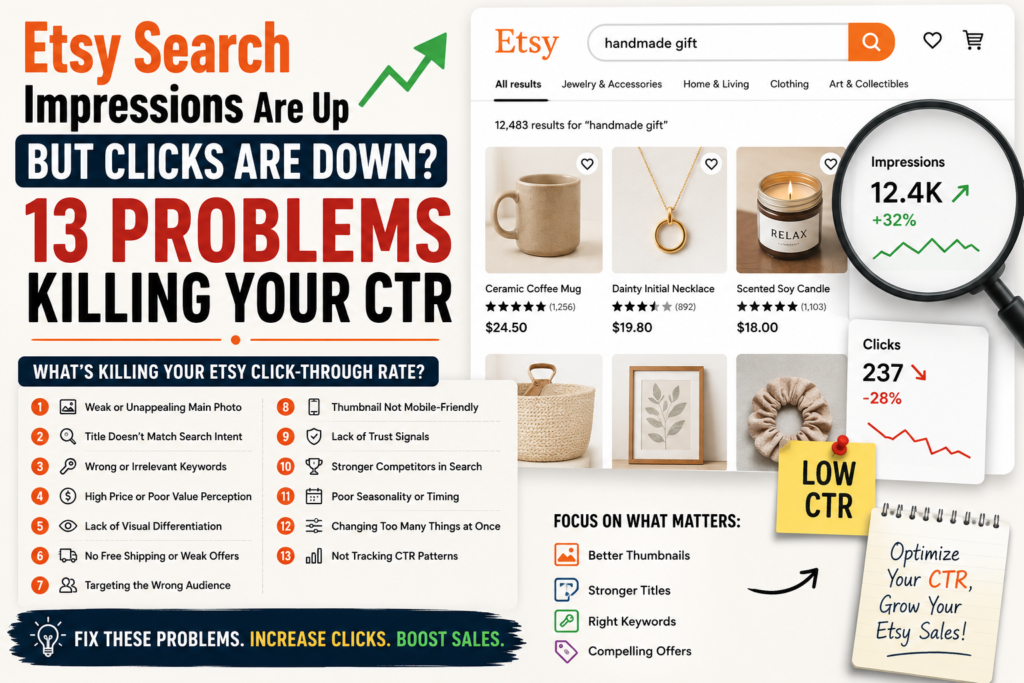
Etsy Search Impressions vs. Listing Clicks
An impression generally means your listing appeared where a shopper could see it in Etsy search. A click happens when that shopper finds your listing compelling enough to open the product page.
Think of it this way: impressions measure visibility; clicks measure initial interest.
You could have 10,000 search impressions and still struggle if shoppers repeatedly scroll past your listing. This is the classic Etsy impressions but no clicks problem—and getting more impressions alone won’t necessarily solve it.
Several elements can influence that split-second click decision:
- Your main listing photo or thumbnail
- The visible wording in your title
- Price and discount presentation
- How your product compares with nearby listings
- Whether the listing matches the shopper’s search intent
This distinction is especially important for newer sellers. Building a store with modern tools can simplify the setup process, as explained in How to Start an Etsy Shop with AI Even If You Have No Experience , but visibility is only the beginning. Once listings appear in search, they still need to earn shopper attention.
How to Know You Have an Etsy CTR Problem
If you’re asking, “Why are my Etsy listings not getting clicks even though they’re being seen?”, start by looking for a pattern—not one bad day.
Your Etsy Click-Through Rate may need attention when search visibility increases over time but listing traffic doesn’t follow. You might also notice that one product earns far more visits than similar listings despite receiving comparable exposure.
Watch for these warning signs:
- Etsy search impressions rise, but visits remain nearly flat.
- Previously clicked listings gradually lose shopper interest.
- Similar products in your shop show dramatically different click patterns.
- Listings rank for searches that don’t closely match buyer intent.
- You keep getting visibility but struggle to increase Etsy listing clicks.
The goal isn’t to panic over every fluctuation. Shopper demand, competition, seasonality, and search behavior can change.
Instead, use your Etsy Click-Through Rate as a diagnostic signal. When shoppers consistently see a listing but don’t choose it, the problem may be happening before they ever reach your description, reviews, or product details.
And that’s exactly where the next section matters.
The following 13 problems reveal what may be killing your clicks—and, more importantly, how to fix each one.
13 Problems Killing Your Etsy Click-Through Rate—and How to Fix Them
Getting more Etsy search impressions sounds like progress—until the clicks fail to follow. When shoppers repeatedly see your products but scroll past them, your listing has a visibility-to-interest gap.
The following 13 problems can quietly damage your Etsy Click-Through Rate. More importantly, each problem has a practical fix you can apply to make your listings more competitive in search.
Problem 1: Your Main Photo Doesn’t Stop the Scroll
Etsy shoppers don’t carefully study every search result. They scan. Within seconds, they compare colors, product styles, prices, and thumbnails before deciding which listing deserves a closer look.
If your main photo is dark, cluttered, poorly cropped, or visually flat, shoppers may skip it—even if the actual product is excellent. This is one of the most common reasons sellers see Etsy impressions but no clicks.
The problem becomes worse when the product occupies only a small portion of the thumbnail. A beautiful lifestyle scene might work on Instagram, but if buyers can’t immediately identify what you’re selling in Etsy search, the image creates confusion instead of curiosity.
Solution: Create a Click-Worthy First Image
Treat your first listing image like a storefront window. Its primary job is not to explain every product feature. Its job is to make the right shopper stop and look closer.
Start by reviewing the thumbnail at actual search-result size. Ask yourself:
- Can I identify the product in one second?
- Is the main item clearly visible?
- Does the image have a strong focal point?
- Is unnecessary background clutter competing for attention?
- Does the photo look polished beside top-ranking listings?
Use bright, balanced lighting and give the product enough visual space to dominate the frame. For physical products, show texture, shape, or scale clearly. For digital products, avoid stuffing ten tiny mockups and multiple lines of unreadable text into one thumbnail.
A stronger first photo can increase Etsy listing clicks without increasing impressions. You are simply making existing visibility work harder.
Before changing your keywords again, inspect your thumbnail. Your SEO may already be getting you seen. The image could be the reason shoppers aren’t taking the next step.
Problem 2: Your Listing Looks Too Similar to Competitors
Search Etsy for a popular product and you’ll often see a wall of nearly identical listings. The same beige background. The same mockup angle. The same neutral color palette. Sometimes even the same Canva-style presentation.
When your listing visually blends into that crowd, shoppers have no immediate reason to choose it.
This doesn’t necessarily mean your product is bad. It means your search-result presentation is forgettable. If five competitors appear to offer essentially the same item, shoppers may click the listing with the strongest visual contrast, clearest product benefit, or most distinctive presentation.
Copying the visual style of successful sellers can feel safe, but excessive similarity makes your product easier to ignore.
Solution: Build Visual Differentiation in Etsy Search
Open Etsy and search your primary keyword as if you were a buyer. Don’t study your listing in isolation. Study the entire search-results page.
Look for repeated patterns:
- Which background colors dominate?
- Are most products photographed from the same angle?
- Do digital listings use similar mockups?
- Which listings immediately catch your eye?
- What makes those thumbnails visually different?
Your goal is not to create a bizarre image purely for attention. You need relevant differentiation.
For example, if competitors use busy lifestyle backgrounds, a clean product-focused image may stand out. If everyone shows the product from the front, a close-up highlighting a unique detail could create curiosity. Digital sellers may benefit from a cleaner mockup that communicates one major outcome instead of displaying every included page.
This type of competitive analysis is especially important for new sellers. If you’re still building your shop and workflow, the principles covered in How to Start an Etsy Shop with AI Even If You Have No Experience can help you understand how AI-assisted research and content creation fit into the broader Etsy setup process.
Don’t ask whether your image looks good. Ask whether it looks click-worthy beside the listings competing for the same shopper.
Problem 3: Your Title Doesn’t Match Shopper Intent
A title can contain the right keyword and still fail to earn clicks.
Imagine a shopper searches for a “personalized bridesmaid gift.” Your listing appears, but the visible part of your title starts with “Custom Handmade Unique Personalized Item…” The keyword may be somewhere in the title, yet the shopper can’t instantly confirm that your product matches what they want.
This creates a relevance problem.
Shoppers scan search results looking for quick confirmation. They want to know, “Is this for me?” If your title is vague, awkward, repetitive, or written entirely for an algorithm, the answer isn’t immediately clear.
That’s when sellers start asking, why are my Etsy listings not getting clicks even though they appear in search?
Solution: Rewrite Titles Around What Buyers Actually Want
Write titles that connect the product with the shopper’s purpose.
Start by identifying three things:
- What is the product?
- Who is it for?
- Why or when are they buying it?
A title such as “Personalized Bridesmaid Gift, Custom Jewelry Box for Maid of Honor” communicates more immediate shopping context than a string of loosely connected keywords.
Prioritize clarity in the beginning of the title. The first visible words should help shoppers recognize product relevance quickly.
Avoid forcing every keyword variation into one title. Repetition may make the title harder to scan and less persuasive to a human buyer.
Review your search terms and ask whether the title naturally reflects the intent behind them. Someone searching for a birthday gift has different priorities from someone searching for wedding decor, even if the same physical product could serve both purposes.
To improve your Etsy Click-Through Rate, stop treating titles as keyword storage. Use them as relevance signals.
Your thumbnail gets attention. Your title confirms that the listing is worth clicking.
Problem 4: You’re Ranking for the Wrong Keywords
More impressions are not always better.
That sounds strange, especially when sellers spend months trying to improve Etsy visibility. But if your listing starts appearing for loosely related searches, impressions can rise while clicks stay flat—or even fall.
Suppose you sell a minimalist printable wedding planner, but your keyword strategy attracts people looking for physical wedding binders. Your listing may appear in search, yet those shoppers aren’t interested in downloading a digital file.
The result? More visibility from the wrong audience.
This is a major reason for Etsy impressions but no clicks. Your listing is technically being seen, but the people seeing it have little reason to engage.
Solution: Target High-Relevance Search Terms
Review your keyword strategy through the lens of buyer intent, not search volume alone.
A high-volume keyword may look attractive, but ask:
- Does my product precisely match this search?
- Would I expect a shopper using this phrase to buy my item?
- Is the shopper looking for physical or digital products?
- Does the keyword imply a specific style, recipient, or occasion?
- Can my main image immediately satisfy that search expectation?
Long-tail search terms can be valuable because they often reveal stronger intent. “Gift for mom” is broad. “Personalized birth flower necklace for mom” communicates a much clearer product expectation.
Your goal isn’t to appear in every possible Etsy search. It is to appear in searches where your listing has a realistic chance of earning attention.
Audit keywords that generate visibility but appear poorly aligned with the product. Then strengthen your title, tags, attributes, and product positioning around highly relevant shopper intent.
If your Etsy Click-Through Rate is falling while impressions rise, don’t automatically celebrate the traffic increase. First, question the quality of that visibility.
Relevant impressions are more valuable than empty exposure.
Problem 5: Your Price Creates Instant Sticker Shock
Shoppers can compare prices before opening your listing. That makes price part of your search-result presentation.
If your product appears at $48 while visually similar listings sit between $18 and $25, shoppers may scroll past before understanding why yours costs more. They haven’t read your description. They haven’t seen your premium materials. They don’t know about the extra customization.
They only see a price gap.
This doesn’t mean you should immediately lower your price. Competing solely on price can destroy margins and attract customers who value discounts more than quality.
The real problem is often a disconnect between price and visible perceived value.
Solution: Improve Price Positioning and Perceived Value
First, compare your listing with products competing for the same keyword. Look at the prices shoppers see around your item.
Then ask a difficult question: Does my thumbnail make my higher price feel justified?
If you sell a premium product, the first image should visually communicate premium quality. Better styling, close-up details, thoughtful packaging, personalization, or a clearly visible product feature can help shoppers understand that the listing isn’t directly comparable to cheaper alternatives.
For bundles, make the quantity or included value easy to understand. A $35 digital package may look expensive beside a $7 template until shoppers realize your product includes 50 editable resources.
Be careful with starting-price variations as well. If shoppers click expecting one price and discover that the desirable version costs significantly more, you may create frustration rather than trust.
Don’t race to the bottom to increase Etsy listing clicks. Instead, align your visual presentation, offer, and product positioning with the price you’re asking shoppers to consider.
A premium price needs a premium first impression.
Problem 6: Discounts and Offers Aren’t Compelling Enough
A sale badge can attract attention, but not every discount creates genuine interest.
Etsy shoppers are surrounded by promotions. When dozens of listings advertise 10%, 15%, or 20% off, another generic discount can become visual background noise.
The bigger issue is that some offers don’t give shoppers a meaningful reason to click now. A small discount on an unfamiliar product may not overcome a weak thumbnail, unclear title, or poor value perception.
Sellers sometimes respond by increasing the discount again and again. That can reduce profit without fixing the actual CTR problem.
Solution: Use Offers That Create a Reason to Click
Think beyond the percentage and evaluate the entire offer.
Ask what matters most to your target buyer. Depending on the product, that could be:
- A clearly priced bundle
- Free shipping positioning
- Multi-item savings
- Seasonal personalization
- A limited collection
- Bonus digital resources
- A stronger quantity-to-price value
The offer should make sense for the shopper’s buying intent.
For example, a wedding buyer may respond more strongly to a coordinated bundle than a small percentage discount. A digital planner customer may value bonus templates. A gift shopper may care more about personalization and presentation.
Your search thumbnail and visible listing information should reinforce that value where appropriate. Don’t force shoppers to investigate deeply before understanding why the offer is interesting.
Also avoid using constant aggressive discounts as a substitute for listing optimization. If your first image is confusing, a 30% sale badge won’t automatically rescue your CTR.
The strongest offers amplify an already relevant product.
Before creating another sale, identify the specific reason a shopper should choose your listing over the results beside it. Build your offer around that reason.
Problem 7: Your Product Is Showing to the Wrong Audience
You can have a polished listing, professional photos, and a competitive price—and still struggle with clicks if Etsy shoppers seeing the product aren’t your ideal buyers.
This often happens when sellers target broad keywords to chase more visibility.
A handmade desk accessory designed for corporate professionals may appear in searches dominated by gaming setups. A minimalist wedding invitation may surface for shoppers seeking colorful floral templates. Technically, the product is related to the search. Emotionally and visually, it doesn’t match the audience.
That mismatch can quietly damage click performance.
Solution: Align Etsy SEO With Buyer Intent
Define the shopper behind each important search term.
Don’t stop at the keyword itself. Ask:
- Who is searching for this phrase?
- What style are they expecting?
- What price range might they consider?
- What problem are they trying to solve?
- What occasion is driving the purchase?
Then compare those expectations with your listing.
Your keywords, title, thumbnail, and product should tell the same story. If your keyword attracts luxury buyers but your presentation looks budget-focused, the positioning is inconsistent. If you target “last-minute gift” searches but your product has a long processing time, shopper intent may not align with the offer.
This is how to improve Etsy CTR at a deeper level. Instead of making cosmetic changes, you improve the connection between search intent and product presentation.
Create a simple buyer-intent note for each major listing. Write one sentence describing the ideal shopper and the exact reason they would search for your product.
If your current keywords attract someone else, reconsider them.
High-quality Etsy traffic isn’t about reaching the largest audience. It’s about getting your listing in front of shoppers who can immediately recognize, “This is exactly what I was looking for.”
Problem 8: Your Thumbnail Is Hard to Understand on Mobile
Your listing image may look beautiful on a 27-inch monitor and completely confusing on a phone.
That’s a serious problem.
Mobile shoppers view Etsy search results on smaller screens, where tiny text, complicated collages, distant products, and subtle details can disappear. If buyers need to zoom in just to understand what you’re selling, they may never open the listing.
Digital product sellers are especially vulnerable. Trying to display 20 templates, five devices, three feature labels, and a bonus badge in one thumbnail usually creates visual overload.
The image contains more information but communicates less.
Solution: Optimize the First Image for Small Screens
Evaluate your main image at thumbnail size—not only inside your editing software.
Take a screenshot of the Etsy search results on your phone and study your listing beside competitors. Can you understand the product without opening it?
Use a simple mobile-first approach:
- Make the main product visually dominant.
- Remove unnecessary decorative elements.
- Use close-up framing where appropriate.
- Keep thumbnail text minimal and readable.
- Create a strong visual hierarchy.
- Avoid complex multi-image collages in the first photo.
For digital products, communicate the primary outcome first. Additional pages, features, and bonuses can appear in later listing images.
For physical products, make sure the item’s shape, material, or key design feature remains visible at a smaller size.
Your first image doesn’t need to explain everything. It needs to create enough clarity and interest to earn the click.
If you’re researching how to improve Etsy CTR, test every redesigned thumbnail on your phone before publishing it. A desktop-only review can hide the exact visual problem your shoppers are experiencing.
Small-screen clarity can make a big difference in search-result appeal.
Problem 9: Your Listing Lacks an Immediate Trust Signal
Shoppers don’t only ask, “Do I like this product?”
They also ask, “Do I trust this listing?”
That judgment can happen surprisingly fast. A poorly edited image, inconsistent mockup, unclear product presentation, or amateur-looking thumbnail can create hesitation before the shopper ever visits your product page.
Established competitors often benefit from polished branding and visible marketplace credibility. Newer shops may need their listing presentation to work harder to earn that initial click.
You cannot explain your excellent customer service to someone who never opens the listing.
Solution: Strengthen Buyer Confidence Before the Click
Start with visual professionalism.
Your main image should look intentional, accurate, and consistent with the product being sold. Avoid blurry photos, awkward crops, excessive graphic effects, or mockups that make the product difficult to evaluate.
Then review the promise created by your thumbnail and title. Are they clear and believable?
For example, vague claims such as “BEST GIFT EVER” may feel less trustworthy than a specific product presentation showing personalization, material, or intended use.
Consistency also matters. If shoppers recognize a cohesive visual style across your products, your shop can appear more established and intentional.
For digital products, use realistic, high-quality mockups but avoid making the item look like a physical product if buyers receive a download. Clarity protects trust.
You don’t need to make a new Etsy shop look like a global retail brand. You need to remove unnecessary reasons for hesitation.
When shoppers compare several similar results, perceived trust can become the deciding factor.
Make the first impression clean. Make the product obvious. Make the visual promise accurate.
Trust begins before the click—even if the full buying decision happens later.
Problem 10: Competitors Have Stronger Search Result Appeal
Sometimes your listing isn’t technically doing anything terrible.
Your competitors are simply doing a better job.
Their thumbnails may be clearer. Their product angle may feel more current. Their title may match the search more precisely. Their price and visible value may create a stronger reason to investigate.
This is why evaluating your listing alone can be misleading.
You might look at your product photo and think, “This is professional.” But shoppers aren’t comparing your listing with your previous version. They’re comparing it with every other option on the screen.
Search is a competitive environment.
Solution: Run a Search Results Competitor Audit
Choose three to five important search terms for your listing. Search them on Etsy and analyze the first page like a shopper.
Create a simple comparison table with these categories:
- First-image clarity
- Visual differentiation
- Product positioning
- Visible title relevance
- Price perception
- Offer strength
- Overall click appeal
Select five to ten listings that immediately catch your attention. Don’t copy them. Identify why they earn attention.
Maybe competitors show the product closer. Perhaps they use lifestyle context more effectively. Maybe their title communicates the recipient or occasion faster.
Now compare your listing objectively.
The goal is to find the click gap—the specific reason a shopper may choose another result before yours.
Run this audit regularly, especially in competitive categories. Search-result presentation changes as new sellers enter the market, trends evolve, and buyer preferences shift.
If you want to increase Etsy listing clicks, your benchmark cannot be “Does my listing look decent?”
The better question is, “Does my listing create a stronger reason to click than the alternatives surrounding it?”
CTR optimization is competitive by nature. Your search neighbors matter.
Problem 11: Your Seasonal Timing Is Working Against You
Not every drop in clicks means your listing is broken.
Sometimes buyer demand has changed.
A graduation gift may attract strong attention in spring and lose momentum later in the year. Holiday decor, teacher gifts, wedding products, and seasonal clothing can all experience changes in search behavior and shopper urgency.
If you compare seasonal performance without context, you may incorrectly assume that your SEO, photos, or titles suddenly failed.
Worse, you might make unnecessary changes to a listing that was performing exactly as expected for its demand cycle.
Solution: Match Listings With Current Shopping Demand
Track product performance alongside seasonal shopping patterns.
Review when impressions and clicks begin rising, when demand peaks, and when interest declines. Use your own historical shop data whenever available rather than relying entirely on general assumptions.
Then prepare listings before demand reaches its highest point.
For seasonal products:
- Refresh relevant images early.
- Review search terms before peak shopping periods.
- Update outdated seasonal positioning.
- Check processing and shipping expectations.
- Make the occasion obvious in your presentation.
Don’t wait until the busiest week to start optimizing.
Also separate seasonal CTR changes from genuine listing problems. If impressions remain strong but clicks suddenly decline during a high-demand period, competitive presentation may need attention. If both impressions and buyer interest naturally fall after an event, seasonality may be the larger factor.
Your Etsy Click-Through Rate should be evaluated with context.
A listing for “First Day of School Sign” shouldn’t be judged in January using the same expectations you had in July or August.
Understand when your buyer is actively shopping. Then align your optimization work with that demand window.
Timing won’t fix a weak listing, but ignoring timing can make healthy performance look like failure.
Problem 12: You Keep Changing Too Many Listing Elements
Your CTR drops, so you change the main photo.
Then you rewrite the title.
The next day, you adjust the price, replace several tags, launch a discount, and redesign the thumbnail again.
Two weeks later, performance changes—but you have no idea why.
This is a common optimization mistake. Sellers become so eager to fix Etsy impressions but no clicks that they change every possible variable at once.
The result is activity without useful insight.
Solution: Test One CTR Variable at a Time
Use a controlled optimization process.
Start with the element most likely to affect the click decision. In many cases, that may be the first image. Make one meaningful change, document the date, and monitor performance over a reasonable comparison period.
Your testing log can include:
- Listing name
- Date of change
- Element changed
- Previous version
- New version
- Impressions
- Click or visit trend
- Notes on seasonality or promotions
Avoid making tiny changes every day based on short-term fluctuations.
If the first-image change appears to improve click performance, you have learned something useful. If it doesn’t, move to the next likely problem, such as title relevance or price positioning.
Not every Etsy shop has enough traffic for fast conclusions. Lower-volume listings may need more time and data before a trend becomes meaningful.
The key is discipline.
You are not trying to constantly “refresh” a listing. You are trying to identify which changes improve shopper response.
A simple testing system makes it easier to understand how to improve Etsy CTR based on your own shop behavior instead of random advice.
Change with a purpose. Track the result. Keep what works.
Problem 13: You’re Tracking Impressions but Ignoring Click Patterns
Watching impressions climb can feel rewarding. It proves that your listings are appearing in search.
But impressions alone don’t tell you whether shoppers find your listing appealing.
If a product repeatedly gains visibility without generating proportional interest, you need to investigate the pattern. Many sellers miss this because they focus on total traffic, total views, or sales without examining how individual listings behave over time.
One weak week doesn’t always matter. A repeated pattern does.
Solution: Monitor Etsy Search Impressions and CTR Trends
Create a simple listing-performance review routine.
You don’t need a complicated analytics dashboard. Start by recording available performance indicators for your priority listings and comparing them over consistent time periods.
Look for patterns such as:
- Impressions rising while clicks or visits remain weak
- Strong click interest but poor sales conversion
- Sudden click declines after an image change
- Seasonal listings losing interest outside peak periods
- One listing consistently outperforming visually similar products
These patterns tell you where to investigate.
If visibility is weak, search relevance may require attention. If Etsy search impressions are healthy but shopper interest is poor, examine your first image, title, price, and search intent alignment. If shoppers click but don’t buy, the problem may occur deeper in the listing or purchase decision.
This distinction prevents wasted optimization work.
Review trends instead of obsessing over daily fluctuations. Compare meaningful periods and document major listing changes so you can connect performance shifts with your actions.
Improving your Etsy Click-Through Rate is not a one-time project. Search competition, buyer preferences, and product demand can change.
The sellers who spot click problems early have a better chance to respond intelligently.
Don’t celebrate impressions by themselves.
Track what shoppers do after they see you. That’s where the real CTR story begins.
How to Improve Etsy CTR Without Chasing More Traffic
More traffic won’t fix a listing shoppers already ignore. If your Etsy Click-Through Rate is weak, sending additional impressions to the same underperforming listing may simply create more opportunities for buyers to scroll past it.
The smarter move is to improve how your existing listings compete in Etsy search. Before trying to increase Etsy listing clicks through more visibility, focus on the products that are already being seen but aren’t earning enough buyer attention.
Fix Your Lowest-Click Listings First
Start with listings that receive healthy Etsy search impressions but attract noticeably fewer clicks than other products in your shop. These are your biggest CTR opportunities because Etsy is already putting the listing in front of shoppers—the listing simply isn’t winning the click.
Don’t rebuild your entire shop at once. Review your listing performance and identify three to five products with the clearest impression-to-click gap. Then compare each one against the listings appearing beside it in Etsy search.
Look closely at:
- The first listing photo and how clearly it communicates the product
- The title and whether the opening words match buyer intent
- The visible price compared with similar products
- Discounts, free shipping, or other visible offer signals
- How easily the product can be understood on a mobile screen
This is where understanding What Is Etsy SEO? A Beginner’s Guide for 2026 becomes useful. Etsy SEO can help a listing gain search visibility, but keyword optimization alone doesn’t guarantee shopper interest. A listing still needs to look relevant and compelling when it appears among competing products.
If you’re seeing Etsy impressions but no clicks, avoid assuming you need more keywords. Your listing may already have enough visibility. The real issue could be a weak thumbnail, unclear positioning, or a mismatch between the search query and what shoppers think you’re selling.
Fix the lowest-click listings first because they offer a measurable starting point. Improve one major element, watch the click pattern, and use the result to guide your next change.
Use a Simple CTR Optimization Priority System
When multiple listings have weak click performance, deciding what to fix first can become overwhelming. A simple priority system helps you spend time on listings with the strongest potential instead of randomly editing products across your shop.
Divide your listings into three groups:
- High impressions + low clicks: Fix these first. They have visibility but aren’t earning attention.
- High impressions + healthy clicks: Protect these listings. Avoid unnecessary changes unless sales or conversion performance shows another problem.
- Low impressions + low clicks: Investigate SEO and search relevance before treating CTR as the primary issue.
For the first group, test your main photo before rewriting every tag or description. Your thumbnail is one of the most immediate visual elements shoppers evaluate in search. If the product is difficult to recognize, blends into competing results, or looks confusing at a small size, title changes alone may not solve the problem.
Next, review search intent and title clarity. Sellers asking why are my Etsy listings not getting clicks often focus on traffic numbers while overlooking whether the listing actually matches the shopper who sees it.
Finally, compare pricing and visible offer positioning. You don’t always need to lower your price. Instead, ask whether shoppers can quickly understand why your product deserves its price compared with the options surrounding it.
This priority system makes how to improve Etsy CTR much less complicated: identify the impression-to-click gap, fix the most visible weakness, test one meaningful change, and measure the result.
Your goal isn’t to chase every possible Etsy visitor. It’s to make more of the shoppers who already see your listings feel that your product is worth the click.
How to Increase Etsy Listing Clicks With a 30-Day Testing Plan
Once you’ve identified what’s hurting your Etsy Click-Through Rate, resist the urge to change everything overnight. A 30-day testing plan gives you enough structure to make focused improvements, watch shopper behavior, and separate meaningful trends from random daily fluctuations.
What to Test During Weeks 1–2
During the first two weeks, focus on the elements shoppers can evaluate before they ever open your listing. Your goal is simple: improve search-result appeal and increase Etsy listing clicks without completely rebuilding the product page.
Start with listings that already receive steady Etsy search impressions but generate weak click activity. These are your best testing candidates because Etsy is already giving them visibility—the listing simply isn’t convincing enough shoppers to take the next step.
Choose one major CTR variable per listing:
- Main thumbnail: Test a brighter, cleaner, or more product-focused first image. Make sure the product is instantly recognizable on a mobile screen.
- Listing title: Move the strongest buyer-focused phrase closer to the beginning and remove confusing or repetitive wording.
- Price positioning: Compare your visible price with similar listings. A major price gap may be creating hesitation before the click.
- Visual differentiation: Study the first page of Etsy search results and identify why your thumbnail blends in.
- Keyword relevance: Check whether the search terms generating impressions actually match the product and buyer intent.
Do not change the photo, title, keywords, and price at the same time. If clicks improve, you won’t know which adjustment worked.
Create a simple testing log with the listing name, date, element changed, previous performance, and reason for the test. This disciplined approach is one of the most practical answers to how to improve Etsy CTR because it replaces guesswork with controlled optimization.
If you’re also using Etsy Ads, verify that ad reporting is working before mixing paid visibility data with organic testing. Reporting gaps can create misleading conclusions, especially when you’re investigating Why Are My Etsy Ad Views Not Showing Up? 9 Fixes That Actually Work] [Internal Link alongside organic impression changes.
What to Measure During Weeks 3–4
Weeks three and four are about observation, comparison, and decision-making. Don’t judge a change because one listing received three extra clicks yesterday. Look for patterns across a reasonable testing window and compare performance with the listing’s previous behavior.
Track these core signals:
- Search impressions: Is Etsy continuing to show the listing?
- Clicks or visits: Are more shoppers opening the listing after seeing it?
- CTR trend: Is the relationship between visibility and clicks improving?
- Favorites: Are visitors showing stronger product interest?
- Orders: Are additional clicks attracting qualified shoppers or simply more browsers?
This is where the Etsy Click-Through Rate story becomes clearer. If impressions remain relatively strong while clicks improve after a thumbnail change, your previous first image may have been the bottleneck. If Etsy impressions but no clicks continue after a visual update, review title relevance, pricing, search intent, and competitive positioning next.
Avoid declaring a test successful based only on more traffic. A listing that attracts additional clicks but produces no favorites, carts, or sales may be pulling in the wrong audience. The purpose of CTR optimization isn’t to collect empty clicks—it’s to attract shoppers who are genuinely interested in what you’re selling.
At the end of day 30, categorize each tested listing as improved, unchanged, or declined. Keep successful changes, investigate unchanged listings, and reconsider changes connected with weaker performance.
Then repeat the process with the next variable.
Improving your Etsy Click-Through Rate is rarely one dramatic fix. It’s a cycle of identifying friction, testing one meaningful change, measuring shopper response, and using that evidence to make the next decision.
How to Find Low Competition Keywords for Etsy That Actually Works in Competitive Niches
Etsy CTR Optimization Checklist: What to Fix First
After reviewing 13 possible CTR problems, the biggest mistake you can make is trying to fix everything at once. Improving your Etsy Click-Through Rate works best when you prioritize the changes shoppers notice first, then build a stronger optimization system around the listings that matter most.
Quick Fixes You Can Make Today
Start with listings that already receive solid Etsy search impressions but generate fewer clicks than your stronger products. These listings have visibility, which means you don’t necessarily need more traffic—you need to give shoppers a better reason to stop and click.
Use this quick CTR checklist:
- Review your first listing photo at thumbnail size. Can you instantly tell what the product is? If the image looks dark, cluttered, zoomed out, or confusing, replace it with a cleaner visual.
- Compare your listing with the top search results. Look at image style, product presentation, price positioning, and title clarity. Your goal isn’t to copy competitors. Identify why their listings command attention faster.
- Read the visible part of your title. Put the clearest product description and buyer-relevant phrase near the front instead of wasting valuable title space on vague wording.
- Check keyword intent. If you have Etsy impressions but no clicks, your listing may be appearing for searches that don’t closely match what you’re selling. Our guide to How to Find Low Competition Keywords for Etsy That Actually Works in Competitive Niches explains how keyword relevance and competition can affect the type of shoppers your listings attract.
- Review your price in search context. A price that looks unusually high—or suspiciously low—beside similar products can reduce clicks before shoppers ever see your product details.
Don’t change your photo, title, keywords, price, and offer on the same day. Pick the most obvious weakness first. A controlled change makes it easier to understand what may be helping you increase Etsy listing clicks.
Long-Term Changes That Protect Your Listing Clicks
Quick fixes can improve weak listings, but a stronger Etsy Click-Through Rate requires ongoing attention to shopper behavior and search competition. What earns clicks today may become less effective as competitors improve their photos, buyer preferences shift, or seasonal demand changes.
Create a simple monthly listing review process. Identify products with rising impressions, compare their click patterns with previous periods, and flag listings where visibility is growing without a similar improvement in shopper interest.
Next, build repeatable standards for your shop. Define what a strong first image should look like, how product-focused titles should begin, and how you evaluate keyword relevance before updating a listing. This prevents random optimization based on panic or guesswork.
You should also audit Etsy search results regularly. Pay attention to new visual trends, competitor positioning, price ranges, badges, offers, and the types of products dominating relevant searches. If your listing suddenly blends into the page, shoppers may scroll past even when your SEO is still generating impressions.
Most importantly, treat CTR optimization as a testing process—not a one-time cleanup. Track meaningful changes, give listings enough time to produce useful performance data, and document what works across similar products.
The goal isn’t simply to ask, “Why are my Etsy listings not getting clicks?” every time traffic changes. The goal is to build a system that helps you spot weak click performance early, make focused improvements, and protect your listing visibility from turning into wasted impressions.
Final Thoughts: Turn Etsy Search Impressions Into More Clicks
Visibility Gets You Seen—CTR Gets You Chosen
More Etsy search impressions mean your listings have a chance to compete, but visibility alone won’t convince shoppers to click. A stronger Etsy Click-Through Rate comes from matching buyer intent with a scroll-stopping thumbnail, clear title, competitive offer, and product positioning that stands out in crowded search results.
Your Next Etsy Listing Optimization Step
Start with the listings getting impressions but no clicks, identify the weakest click-driving element, and test one change at a time. Keyword relevance also matters, especially in crowded categories; understanding How to Find Low Competition Keywords for Etsy That Actually Works in Competitive Niches can help you attract better-matched shoppers instead of chasing empty visibility. Fix what shoppers see first, track the results, and turn more impressions into qualified clicks.